

6 O/Rマッピング (GORM) - Reference Documentation
Authors: Graeme Rocher, Peter Ledbrook, Marc Palmer, Jeff Brown, Luke Daley, Burt Beckwith
Version: 2.3.0
Translated by: T.Yamamoto, Japanese Grails Doc Translating Team. Special thanks to NTT Software.
【注意】このドキュメントの内容はスナップショットバージョンを元に*意訳*されているため、一部現行バージョンでは未対応の機能もあります。
Table of Contents
6 O/Rマッピング (GORM)
Domain classes are core to any business application. They hold state about business processes and hopefully also implement behavior. They are linked together through relationships; one-to-one, one-to-many, or many-to-many.
ドメインクラスは業務アプリケーションの中心です。
それらは業務プロセスについての状態や振る舞いを保持します。
また、それらは1対1、1対多、多対多などの関連を通して結びつけられます。GORM is Grails' object relational mapping (ORM) implementation. Under the hood it uses Hibernate 3 (a very popular and flexible open source ORM solution) and thanks to the dynamic nature of Groovy with its static and dynamic typing, along with the convention of Grails, there is far less configuration involved in creating Grails domain classes.
GORMは、Grailsのオブジェクトリレーショナルマッピング(ORM)の実装です。
その裏では、広く使われていて柔軟性の高いオープンソースORMであるHibernate 3を利用しています。
Grailsの規約と、静的・動的型付けというGroovyのダイナミックな特性のおかげで、Grailsのドメインクラスに必要となる設定はほとんどありません。You can also write Grails domain classes in Java. See the section on Hibernate Integration for how to write domain classes in Java but still use dynamic persistent methods. Below is a preview of GORM in action:
GrailsのドメインクラスをJavaで書くこともできます。
Javaでドメインクラスを書いて、動的な永続化メソッドも使えるようにする方法については、GrailsとHibernateのセクションを参照してください。以下は、GORMのサンプルコードです:
def book = Book.findByTitle("Groovy in Action")book
  .addToAuthors(name:"Dierk Koenig")
  .addToAuthors(name:"Guillaume LaForge")
  .save()
6.1 クイックスタートガイド
A domain class can be created with the create-domain-class command:
以下のようにcreate-domain-classコマンドでドメインクラスを作成できます。grails create-domain-class helloworld.Person
If no package is specified with the create-domain-class script, Grails automatically uses the application name as the package name.パッケージ名を指定しない場合、自動的にアプリケーション名をパッケージ名として使用します。
This will create a class at the location
コマンドを実行するとgrails-app/domain/helloworld/Person.groovy such as the one below:grails-app/domain/helloworld/Person.groovyに以下のようなドメインクラスを作成します。package helloworldclass Person {
}If you have theデータソースのdbCreateproperty set to "update", "create" or "create-drop" on your DataSource, Grails will automatically generate/modify the database tables for you.dbCreateプロパティに"update", "create" または "create-drop"が設定されている場合は、ドメインクラスに対応したデータベースのテーブルを自動的に作成/修正します。
You can customize the class by adding properties:
プロパティを追加することでドメインクラスをカスタマイズできます。class Person {
String name
Integer age
Date lastVisit
}grails console
This loads an interactive GUI where you can run Groovy commands with access to the Spring ApplicationContext, GORM, etc.
このコマンドはGroovyコードを実行可能なインタラクティブなGUIを起動します。GroovyコードからSpring ApplicationContextやGORMなどを使用できます。
6.1.1 基本CRUD
Try performing some basic CRUD (Create/Read/Update/Delete) operations.
いくつかの単純なCRUD操作(作成/参照/更新/削除)を実行してみましょう。h4. Create
作成
To create a domain class use Map constructor to set its properties and call save:
ドメインクラスを作成するにはマップコンストラクタでプロパティをセットし、saveメソッドを呼び出します。def p = new Person(name: "Fred", age: 40, lastVisit: new Date()) p.save()
The save method will persist your class to the database using the underlying Hibernate ORM layer.
上記のsaveメソッドはHibernateのORM層を通じてドメインクラスをデータベースに永続化します。h4. Read
参照
Grails transparently adds an implicit
Grailsはユーザが特に意識しなくても暗黙的なid property to your domain class which you can use for retrieval:idプロパティをドメインクラスの永続化時に付与します。このidによって検索時にドメインクラスを一意に識別することができます。def p = Person.get(1) assert 1 == p.id
This uses the get method that expects a database identifier to read the
このgetメソッドは引数にデータベースの主キーを受け取り、データベースから主キーに対応するPerson object back from the database.Personオブジェクトを返します。
You can also load an object in a read-only state by using the read method:
readメソッドを使用することで、読み取り専用でオブジェクトを参照することができます。def p = Person.read(1)
In this case the underlying Hibernate engine will not do any dirty checking and the object will not be persisted. Note that
if you explicitly call the save method then the object is placed back into a read-write state.
読み取り専用でオブジェクトを参照した場合は、下層のHibernateはdirtyチェックと永続化処理を行いません。
しかし、saveメソッドを明示的に呼び出した時は、オブジェクトは読み書き可能な状態に戻るということに留意してください。In addition, you can also load a proxy for an instance by using the load method:
さらにloadメソッドを使用することで、プロキシインスタンスを参照することができます。def p = Person.load(1)
This incurs no database access until a method other than getId() is called. Hibernate then initializes the proxied instance, or
throws an exception if no record is found for the specified id.
このプロキシインスタンスはgetId()メソッド以外の何らかのメソッドを呼び出すまでデータベースにアクセスしません。getId()メソッド以外の何らかのメソッドを呼び出した時に、Hibernateがプロキシインスタンスを初期化します。対象の主キーを持つレコードが見つからなかった場合は例外が投げられます。h4. Update
更新
To update an instance, change some properties and then call save again:
インスタンスを更新するには、いずれかのプロパティを変更した後で作成と同じようにsaveメソッドを使用します。def p = Person.get(1)
p.name = "Bob"
p.save()h4. Delete
削除
To delete an instance use the delete method:
インスタンスを削除するにはdeleteメソッドを使用します。def p = Person.get(1) p.delete()
6.2 GORMでのドメインモデリング
When building Grails applications you have to consider the problem domain you are trying to solve. For example if you were building an Amazon-style bookstore you would be thinking about books, authors, customers and publishers to name a few.
Grailsアプリケーションを構築するときは、解決しようとしている問題のドメインについて深く考える必要があります。例えば、Amazonのような書店を構築する場合のドメインをいくつか挙げるなら、本、著者、購入者、そして出版社などについて考えることになるでしょう。These are modeled in GORM as Groovy classes, so a
そのようなドメインはGroovyのクラスとしてGORM内でモデル化されており、Book class may have a title, a release date, an ISBN number and so on. The next few sections show how to model the domain in GORM.Bookクラスはタイトル、出版日、ISBNコードなどを持つでしょう。以降のいくつかの節でGORM内でどのようにドメインをモデル化すればよいかをお見せします。To create a domain class you run the create-domain-class command as follows:
ドメインクラスを作成するために、次のようにcreate-domain-classコマンドを実行します。grails create-domain-class org.bookstore.Book
The result will be a class at
grails-app/domain/org/bookstore/Book.groovy:grails-app/domain/org/bookstore/Book.groovyクラスが作成されます。package org.bookstoreclass Book {
}This class will map automatically to a table in the database called
このクラスは自動的にデータベースのbook (the same name as the class). This behaviour is customizable through the ORM Domain Specific Languagebookテーブル(作成したクラスと同じ名前)と対応付けられます。この動作はORMのドメイン固有言語によってカスタマイズできます。Now that you have a domain class you can define its properties as Java types. For example:
先ほど作成したドメインクラスに、Javaの型を持つプロパティを定義することができます。例:package org.bookstoreclass Book { String title Date releaseDate String ISBN }
Each property is mapped to a column in the database, where the convention for column names is all lower case separated by underscores. For example
定義した各プロパティは規約として、大文字はアンダースコアをつけて小文字にしたデータベースのカラムに対応付けられます。例えば、releaseDate maps onto a column release_date. The SQL types are auto-detected from the Java types, but can be customized with Constraints or the ORM DSL.releaseDateプロパティはrelease_dateカラムに対応付けられます。SQLの型はJavaの型から自動的に判別されますが、ConstraintsやORMのドメイン固有言語によってカスタマイズすることができます。
6.2.1 GORMでの関連
Relationships define how domain classes interact with each other. Unless specified explicitly at both ends, a relationship exists only in the direction it is defined.
ドメインクラスがどのように相互作用するのかを関連として定義します。両側のドメインクラスで明確に関連が定義されていない限り、関連はそれが定義された方向にだけ存在します。
6.2.1.1 多対1、1対1 (Many-to-One, One-to-one)
A many-to-one relationship is the simplest kind, and is defined with a property of the type of another domain class. Consider this example:
多対1の関連は最も単純で、他のドメインクラス型のプロパティとして定義されます。次のような例を考えてみましょう。Example A
class Face {
    Nose nose
}
class Nose {
}In this case we have a unidirectional many-to-one relationship from
この場合は、Face to Nose. To make this relationship bidirectional define the other side as follows (and see the section on controlling the ends of the association just below):FaceからNoseへの単方向の多対1の関連が存在しています。この関連を双方向にする場合は、もう片方のクラスを次のように定義します。(加えて本項最後の関連の両端をコントロールするの項を参照してください。)Example B
class Face {
    Nose nose
}
class Nose {
static belongsTo = [face:Face]
}In this case we use the
この場合belongsTo setting to say that Nose "belongs to" Face. The result of this is that we can create a Face, attach a Nose instance to it and when we save or delete the Face instance, GORM will save or delete the Nose. In other words, saves and deletes will cascade from Face to the associated Nose:belongsToを設定することで、Nose"が"Faceに"属している"ということを表現しています。結果として、Noseインスタンスを保持するFaceインスタンスを作成し、そのFaceインスタンスをsave、deleteした場合、GORMはNoseのsave、deleteを自動的に行います。別の言い方をすれば、saveとdeleteがFaceから関連したNoseへcascadeします。new Face(nose:new Nose()).save()
The example above will save both face and nose. Note that the inverse is not true and will result in an error due to a transient
上記の例はfaceとnoseの両方を作成します。双方向の関連を持っていますが、faceとnoseの対応を逆にした場合はFace:Faceが保存されず、意図しない動作となる点に注意してください。new Nose(face:new Face()).save() // will cause an error
new Nose(face:new Face()).save() // 意図しない動作 Noseは保存されるが、Faceは保存されない
Now if we delete the
次にFace instance, the Nose will go too:Faceインスタンスを削除すると、Noseも削除される例です:def f = Face.get(1) f.delete() // both Face and Nose deleted
def f = Face.get(1)
f.delete() // FaseとNose両方が削除される
To make the relationship a true one-to-one, use the
本当の1対1の関連を作る場合、関連を保持する側にhasOne property on the owning side, e.g. Face:hasOneプロパティを使います。Faceの例:Example C
class Face {
    static hasOne = [nose:Nose]
}
class Nose {
Face face
}Note that using this property puts the foreign key on the inverse table to the previous example, so in this case the foreign key column is stored in the
1つ前のExample Bでは、nose table inside a column called face_id. Also, hasOne only works with bidirectional relationships.faceテーブルにnoseテーブルへの外部キーが生成されますが、このプロパティを使用すると外部キーが作成されるテーブルが逆になる点に注意してください。この例だと、noseテーブルにface_idカラムが追加されます。hasOneも双方向の関連としてのみ動作します。Finally, it's a good idea to add a unique constraint on one side of the one-to-one relationship:
最後に、1対1関連の片側にユニーク制約を付加しておくと良いでしょう。class Face {
static hasOne = [nose:Nose] static constraints = {
nose unique: true
}
}class Nose {
Face face
}h5. Controlling the ends of the association
関連の両端をコントロールする
Occasionally you may find yourself with domain classes that have multiple properties of the same type. They may even be self-referential, i.e. the association property has the same type as the domain class it's in. Such situations can cause problems because Grails may guess incorrectly the type of the association. Consider this simple class:
時々、同じ種類のプロパティを複数持つドメインクラスを作成することがあるでしょう。自己参照を持つ場合さえあります。例えば、関連するプロパティの種類が、自分自身の種類と同じドメインクラスなどです。 そのような状態が問題となる場合があります。これはGrailsが関連の種類を誤って推測するために起こりえます。次のシンプルなクラスについて考えてみましょう:class Person {
String name
Person parent static belongsTo = [ supervisor: Person ] static constraints = { supervisor nullable: true }
}As far as Grails is concerned, the
Grailsの動作としては、parent and supervisor properties are two directions of the same association. So when you set the parent property on a Person instance, Grails will automatically set the supervisor property on the other Person instance. This may be what you want, but if you look at the class, what we in fact have are two unidirectional relationships.parentプロパティとsupervisorプロパティを2方向の同じ関連として扱います。つまり、PersonインスタンスAのparentプロパティにPersonインスタンスBを格納した時、Grailsは自動的にPersonインスタンスBのsupervisorプロパティにPersonインスタンスAを格納します。 これは期待した動作かもしれません。しかしクラスを見れば、むしろ2つの単方向の関連を持つことを期待するでしょう。To guide Grails to the correct mapping, you can tell it that a particular association is unidirectional through the
正しいマッピングをGrailsに伝えるために、 mappedBy property:mappedByプロパティを使用して特定の関連が単方向であることを示すことができます:class Person {
String name
Person parent static belongsTo = [ supervisor: Person ] static mappedBy = [ supervisor: "none", parent: "none" ] static constraints = { supervisor nullable: true }
}You can also replace "none" with any property name of the target class. And of course this works for normal domain classes too, not just self-referential ones. Nor is the
対象クラスのどんなプロパティ名も"none"に置き換えることができます。もちろん自己参照の時だけではなく一般的なドメインクラスに対してもこの方法は動作します。そしてmappedBy property limited to many-to-one and one-to-one associations: it also works for one-to-many and many-to-many associations as you'll see in the next section.mappedByプロパティは多対1と1対1関連だけに限定されていません。次項でわかるように、1対多と多対多の関連の場合も動作します。If you have a property called "none" on your domain class, this approach won't work currently! The "none" property will be treated as the reverse direction of the association (or the "back reference"). Fortunately, "none" is not a common domain class property name.
ドメインクラスに"none"という名前のプロパティがある場合はこの方法は上手く動きません! "none"プロパティは反対方向、あるいは後方への参照として扱われます。 "none"はプロパティ名としては珍しい名前のため、特に気にする必要はないでしょう。
6.2.1.2 1対多 (One-to-many)
A one-to-many relationship is when one class, example
1対多の関連は、Author, has many instances of another class, example Book. With Grails you define such a relationship with the hasMany setting:
Authorのような1つのクラス、Bookのような他クラスのインスタンスを複数保持します。
GrailsではhasManyの設定でこの関連を定義します。class Author {
static hasMany = [books: Book] String name
}class Book {
String title
}
In this case we have a unidirectional one-to-many. Grails will, by default, map this kind of relationship with a join table.
この場合は単方向の1対多を持っています。
Grailsはデフォルトでは結合テーブルによって、この種類の関連をマップします。The ORM DSL allows mapping unidirectional relationships using a foreign key association instead
ORM DSLでは代わりに外部キーの参照を使用した単方向関連の設定もできます。
Grails will automatically inject a property of type
Grailsはjava.util.Set into the domain class based on the hasMany setting. This can be used to iterate over the collection:
hasManyを持つドメインクラスにjava.util.Set型のプロパティを自動的に注入します。
このコレクションはイテレートして使えます。def a = Author.get(1)for (book in a.books) {
println book.title
}The default fetch strategy used by Grails is "lazy", which means that the collection will be lazily initialized on first access. This can lead to the n+1 problem if you are not careful.If you need "eager" fetching you can use the ORM DSL or specify eager fetching as part of a query
Grailsによるデフォルトのフェッチ戦略は"lazy"です。これは最初のアクセスによってコレクションが遅延初期化されること意味します。 この遅延初期化は、注意を怠るとN+1問題を引き起こします。もし"eager"フェッチが必要な場合は、ORM DSLを使うか、またはクエリ中で"eager"フェッチを指定してください。
The default cascading behaviour is to cascade saves and updates, but not deletes unless a
デフォルトでは保存と更新がカスケードされます。しかし、削除はbelongsTo is also specified:
belongsToが指定されるまでカスケードされません。class Author {
static hasMany = [books: Book] String name
}class Book {
static belongsTo = [author: Author]
String title
}
If you have two properties of the same type on the many side of a one-to-many you have to use
もし、1対多の「多」側で同じ型のプロパティが2つある場合は、マップされるコレクションを指定するためにmappedBy to specify which the collection is mapped:
mappedByを使ってください。class Airport {
static hasMany = [flights: Flight]
static mappedBy = [flights: "departureAirport"]
}class Flight {
Airport departureAirport
Airport destinationAirport
}
This is also true if you have multiple collections that map to different properties on the many side:
これは、「多」側で異なるプロパティへマップされた複数のコレクションがある場合でも同じです。class Airport {
static hasMany = [outboundFlights: Flight, inboundFlights: Flight]
static mappedBy = [outboundFlights: "departureAirport",
inboundFlights: "destinationAirport"]
}class Flight {
Airport departureAirport
Airport destinationAirport
}6.2.1.3 多対多 (Many-to-many)
Grails supports many-to-many relationships by defining a
Grailsでは関連の両側でhasMany on both sides of the relationship and having a belongsTo on the owned side of the relationship:
hasManyを定義し、関連の所有される側にbelongsToを付けることで、多対多の関連をサポートします。class Book {
static belongsTo = Author
static hasMany = [authors:Author]
String title
}class Author {
static hasMany = [books:Book]
String name
}
Grails maps a many-to-many using a join table at the database level. The owning side of the relationship, in this case
Grailsはデータベースレベルでは結合テーブルを使用して多対多をマップします。
関連の所有する側(この例ではAuthor, takes responsibility for persisting the relationship and is the only side that can cascade saves across.
Author)は、関連の永続化の責務を持ちます。そして、この所有する側からのみ保存のカスケードが可能です。
For example this will work and cascade saves:
例えば、これは正しくカスケード保存されます。new Author(name:"Stephen King") .addToBooks(new Book(title:"The Stand")) .addToBooks(new Book(title:"The Shining")) .save()
However this will only save the
しかし、これはBook and not the authors!
Bookだけが保存されauthorsは保存されません!new Book(name:"Groovy in Action") .addToAuthors(new Author(name:"Dierk Koenig")) .addToAuthors(new Author(name:"Guillaume Laforge")) .save()
This is the expected behaviour as, just like Hibernate, only one side of a many-to-many can take responsibility for managing the relationship.
Hibernateがそうであるように、多対多の片側だけが関連を管理する責務を持てるので、これは期待通りの振る舞いです。Grails' Scaffolding feature does not currently support many-to-many relationship and hence you must write the code to manage the relationship yourself
Grailsのスカッフォルドは現在、多対多の関連をサポートしていません。 そのため、関連を管理するコードは自分で書かなければなりません。
6.2.1.4 基本コレクション型
As well as associations between different domain classes, GORM also supports mapping of basic collection types.
For example, the following class creates a
異なるドメインクラス間の関連に加えて、GORMは基本コレクション型のマッピングもサポートしています。
例えば、以下のクラスはnicknames association that is a Set of String instances:
StringのSetであるnicknamesの関連を作成します。class Person {
static hasMany = [nicknames: String]
}
GORM will map an association like the above using a join table. You can alter various aspects of how the join table is mapped using the
GORMでは、上記のような関連は結合テーブルを用いてマップされます。
joinTable argument:
joinTable引数を使って、どのように結合テーブルにマップされるかを変更できます。class Person { static hasMany = [nicknames: String] static mapping = {
hasMany joinTable: [name: 'bunch_o_nicknames',
key: 'person_id',
column: 'nickname',
type: "text"]
}
}
The example above will map to a table that looks like the following:
例えば、上記は以下のようなテーブルにマップします。bunch_o_nicknames Table
---------------------------------------------
| person_id         |     nickname          |
---------------------------------------------
|   1               |      Fred             |
---------------------------------------------
6.2.2 GORMでのコンポジション
As well as association, Grails supports the notion of composition. In this case instead of mapping classes onto separate tables a class can be "embedded" within the current table. For example:
関連に加えて、Grailsはコンポジションの概念をサポートしています。
次の場合は、それぞれのドメインクラス毎に別々のテーブルにマッピングされる代わりに、別のドメインクラスのカラムを対象ドメインクラスのテーブルに「埋め込む」ことができます。class Person {
Address homeAddress
Address workAddress
static embedded = ['homeAddress', 'workAddress']
}class Address {
String number
String code
}
The resulting mapping would looking like this:
マッピング結果はこのようになります。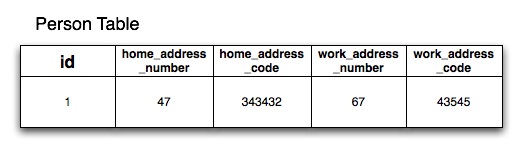
If you define theAddressclass in a separate Groovy file in thegrails-app/domaindirectory you will also get anaddresstable. If you don't want this to happen use Groovy's ability to define multiple classes per file and include theAddressclass below thePersonclass in thegrails-app/domain/Person.groovyfile
もしgrails-app/domainディレクトリ内に別のGroovyファイルとしてAddressクラスを定義した場合は、以前と同じようにaddressテーブルが作成されてしまいます。 これを避けたい場合は、1ファイルに複数のクラスを定義できるGroovyの能力を使い、grails-app/domain/Person.groovyファイルのPersonクラスの下にAddressクラスを含めてください。
6.2.3 GORMでの継承
GORM supports inheritance both from abstract base classes and concrete persistent GORM entities. For example:
GORMは抽象クラス、または他のGORMエンティティクラスからの継承をサポートしています。
例えば:class Content {
String author
}class BlogEntry extends Content {
URL url
}class Book extends Content { String ISBN }
class PodCast extends Content {
    byte[] audioStream
}
In the above example we have a parent
上の例では、親のContent class and then various child classes with more specific behaviour.
Contentクラスと個別の振る舞いを持ったさまざまな子クラスを定義しています。Considerations
考慮すべきこと
At the database level Grails by default uses table-per-hierarchy mapping with a discriminator column called
データベースレベルでは、Grailsはデフォルトでclass so the parent class (Content) and its subclasses (BlogEntry, Book etc.), share the same table.
classという名前の識別カラムと共にtable-per-hierarchyマッピングを使います。
これは親クラス(Content)と、その子クラス(BlogEntryやBookなど)が同じテーブル上に格納されます。
Table-per-hierarchy mapping has a down side in that you cannot have non-nullable properties with inheritance mapping. An alternative is to use table-per-subclass which can be enabled with the ORM DSL
table-per-hierarchyマッピングは継承先のマッピングで非nullableプロパティを持てないという難点があります。
代替手段はtable-per-subclassを使うことです。
これはORM DSLで有効にできます。
However, excessive use of inheritance and table-per-subclass can result in poor query performance due to the use of outer join queries. In general our advice is if you're going to use inheritance, don't abuse it and don't make your inheritance hierarchy too deep.
しかし、過度の継承とtable-per-subclassの使用は、外部結合(OUTER JOIN)のせいでクエリ性能が劣化する可能性があります。
一般的なアドバイスとして、もし継承を使うなら、継承を乱用せず、継承階層が深くならないようにしてください。Polymorphic Queries
ポリモーフィズムなクエリ
The upshot of inheritance is that you get the ability to polymorphically query. For example using the list method on the
継承の結果としてポリモーフィズムを使ったクエリが可能になります。
例えば、親のContent super class will return all subclasses of Content:
Contentクラス上でlistメソッドを使うと、Contentのすべてのサブクラスが返されます:def content = Content.list() // list all blog entries, books and podcasts
content = Content.findAllByAuthor('Joe Bloggs') // find all by authordef podCasts = PodCast.list() // list only podcasts6.2.4 セット、リスト、マップ
h4. Sets of Objects
オブジェクトのセット
By default when you define a relationship with GORM it is a
デフォルトでは、GORMを使って関連を定義した場合、java.util.Set which is an unordered collection that cannot contain duplicates. In other words when you have:
java.util.Setになります。
これは、順序を持たないコレクションで、重複要素を含めません。
言い換えると、次のようなドメインクラスがあるとき:class Author {
static hasMany = [books: Book]
}
The books property that GORM injects is a
GORMが注入するjava.util.Set. Sets guarantee uniquenes but not order, which may not be what you want. To have custom ordering you configure the Set as a SortedSet:
booksプロパティはjava.util.Setになる、ということです。
セットはユニーク性を保証しますが、順序は保証しません。
これでは都合が悪い場合もあるかもしれません。
独自の順序を持つにはセットをSortedSetに設定します:class Author { SortedSet books static hasMany = [books: Book]
}
In this case a
この場合は、java.util.SortedSet implementation is used which means you must implement java.lang.Comparable in your Book class:
java.util.SortedSetの実装が使われます。
これは、Bookクラスでjava.lang.Comparableを実装しなければならないことを意味します:class Book implements Comparable { String title Date releaseDate = new Date() int compareTo(obj) { releaseDate.compareTo(obj.releaseDate) } }
The result of the above class is that the Book instances in the books collection of the Author class will be ordered by their release date.
上記のようにクラスを変更することで、Authorクラスのbooksコレクションのインスタンスがリリース日時順になります。Lists of Objects
オブジェクトのリスト
To keep objects in the order which they were added and to be able to reference them by index like an array you can define your collection type as a
追加された順にオブジェクトを保ち、配列のようにインデックスで参照できるようにするには、コレクション型をListで定義します:List:
class Author {    List books    static hasMany = [books: Book]
}
In this case when you add new elements to the books collection the order is retained in a sequential list indexed from 0 so you can do:
この場合は、新しい要素をbooksコレクションへ追加したときに、0からインデックスが付与された一連のリストとして、順序が保持されます。
そして、次のようにアクセスできます:author.books[0] // get the first book
The way this works at the database level is Hibernate creates a
データベースレベルにおいて、Hibernateはデータベース上に順序を保持するために、books_idx column where it saves the index of the elements in the collection to retain this order at the database level.
books_idxカラムを作成して、コレクション内の要素のインデックスを保存します。
When using a
List, elements must be added to the collection before being saved, otherwise Hibernate will throw an exception (org.hibernate.HibernateException: null index column for collection):
Listを使った場合、要素は保存前にコレクションへ追加されなければなりません。
コレクション追加前に単体で保存されてしまっていると、Hibernateが例外をスローします(org.hibernate.HibernateException: コレクションのインデックスカラムがnull)。// This won't work! def book = new Book(title: 'The Shining') book.save() author.addToBooks(book)// Do it this way instead. def book = new Book(title: 'Misery') author.addToBooks(book) author.save()
h4. Bags of Objects
オブジェクトのバッグ(Bag)
If ordering and uniqueness aren't a concern (or if you manage these explicitly) then you can use the Hibernate Bag type to represent mapped collections.
ユニークや順序が必要の無い場合は(また明示的に自分で管理する場合)、HibernateのBag型をコレクションマップとして使用できます。The only change required for this is to define the collection type as a
この場合はコレクションの型をCollection:Collection型として定義します。class Author { Collection books static hasMany = [books: Book]
}Since uniqueness and order aren't managed by Hibernate, adding to or removing from collections mapped as a Bag don't trigger a load of all existing instances from the database, so this approach will perform better and require less memory than using a
Hibernateでユニークとオーダーが管理されないので、Bagにマップされたコレクションは、追加削除時に既存のインスタンスをデータベースからロードしません。このためSet or a List.Setまたは@Listよりメモリ使用量が少なくパフォーマンスが良くなります。h4. Maps of Objects
オブジェクトのマップ
If you want a simple map of string/value pairs GORM can map this with the following:
文字列/値のような、単純なマップを使用する場合、GORMでは次のように定義します。class Author {
Map books // map of ISBN:book names
}def a = new Author()
a.books = ["1590597583":"Grails Book"]
a.save()In this case the key and value of the map MUST be strings.
このケースでは、 キーと値は必ず文字列である必要があります。If you want a Map of objects then you can do this:
オブジェクトのマップが必要な場合は次のように:class Book { Map authors static hasMany = [authors: Author]
}def a = new Author(name:"Stephen King")def book = new Book()
book.authors = [stephen:a]
book.save()The static
hasMany property defines the type of the elements within the Map. The keys for the map must be strings.hasManyプロパティで、Mapのエレメントの型を定義します。マップのキーは必ず文字列にしてください。A Note on Collection Types and Performance
コレクション型とパフォーマンスについて
The Java
JavaのSet type doesn't allow duplicates. To ensure uniqueness when adding an entry to a Set association Hibernate has to load the entire associations from the database. If you have a large numbers of entries in the association this can be costly in terms of performance.
Set型は重複を許容しません。
Setの関連へエントリを追加するときに、ユニーク性を保証するため、Hibernateはデータベースからすべての関連を読み込まなければなりません。
もし関連のエントリの数が大量の場合、パフォーマンスの点でコストがかかりすぎる可能性があります。
The same behavior is required for
同じ振る舞いがList types, since Hibernate needs to load the entire association to maintain order. Therefore it is recommended that if you anticipate a large numbers of records in the association that you make the association bidirectional so that the link can be created on the inverse side. For example consider the following code:
List型でも必要になります。
これは、Hibernateがすべての関連の順序を保持するため、事前にすべての関連を読み込む必要があるからです。
そのため、事前に関連エントリが大量になることがわかっている場合は、双方向関連にして、反対側から関連を作成することをお勧めします。
たとえば、以下のコードを考えてみます:def book = new Book(title:"New Grails Book") def author = Author.get(1) book.author = author book.save()
In this example the association link is being created by the child (Book) and hence it is not necessary to manipulate the collection directly resulting in fewer queries and more efficient code. Given an
この例では、関連は子(Book)によって作成されます。
このようにすることで、直接コレクションを操作する必要がなくなるため、より少ないクエリで効率的なコードとなります。
Author with a large number of associated Book instances if you were to write code like the following you would see an impact on performance:
Authorと関連する大量のBookインスタンスが与えられたとき、下のようなコードを書いてしまうとパフォーマンスに重大な影響があります:def book = new Book(title:"New Grails Book") def author = Author.get(1) author.addToBooks(book) author.save()
You could also model the collection as a Hibernate Bag as described above.
また、上記で説明したように、HibernateのBagとしてコレクションを作ることもできます。
6.3 永続化の基礎
A key thing to remember about Grails is that under the surface Grails is using Hibernate for persistence. If you are coming from a background of using ActiveRecord or iBatis/MyBatis, Hibernate's "session" model may feel a little strange.
Grailsでは、永続化実現のためにHibernate が使われています。Hibernateは「セッション」という概念を採用していますが、この概念はActiveRecord やiBatis/MyBatisに慣れ親しんでいる人にとっては、少し不可解に感じるかも知れません。Grails automatically binds a Hibernate session to the currently executing request. This lets you use the save and delete methods as well as other GORM methods transparently.
Grailsは、自動的に、現在実行中のリクエストにHibernateのセッションをバインドします。そのため、saveメソッドやdeleteメソッドを、他のGORMメソッドと同様に透過的に利用することができます。h4. Transactional Write-Behind
トランザクション内における遅延書き込み
A useful feature of Hibernate over direct JDBC calls and even other frameworks is that when you call save or delete it does not necessarily perform any SQL operations at that point. Hibernate batches up SQL statements and executes them as late as possible, often at the end of the request when flushing and closing the session. This is typically done for you automatically by Grails, which manages your Hibernate session.
Hibernateは、直接JDBC APIを呼び出す方法や、他のフレームワークを使う方法と比べて便利な特徴を備えています。具体的にはsaveメソッドやdeleteメソッドを呼び出した瞬間にはSQLを発行せず、できる限り後ろで、まとめて発行しようとします。セッションがフラッシュ、またはクローズされるまでSQLが発行されないことも珍しくありません。なお、通常では、これらの動作はHibernateのセッションを管理しているGrailsによって自動的に行われます。Hibernate caches database updates where possible, only actually pushing the changes when it knows that a flush is required, or when a flush is triggered programmatically. One common case where Hibernate will flush cached updates is when performing queries since the cached information might be included in the query results. But as long as you're doing non-conflicting saves, updates, and deletes, they'll be batched until the session is flushed. This can be a significant performance boost for applications that do a lot of database writes.
Hibernateは、データベースの更新についても可能な限りキャッシュします。具体的には、Hibernateによって必要と判断されたときか、プログラム上でflushが行われたときにのみ、キャッシュの反映が行われます。キャッシュの反映が行われる良くあるケースの1つに、キャッシュされたままのクエリーによる更新結果を利用するようなクエリーを実行した場合が挙げられます。ただし、後続するクエリーと競合しないような保存、更新、削除のみを実行している限りは、キャッシュの反映は遅延され、セッションがフラッシュされるタイミングで、まとめてクエリーが実行されることになります。このような仕組みによって、大量のデータベース更新を行うアプリケーションの性能が大幅に向上します。Note that flushing is not the same as committing a transaction. If your actions are performed in the context of a transaction, flushing will execute SQL updates but the database will save the changes in its transaction queue and only finalize the updates when the transaction commits.
なお、キャッシュの反映とトランザクションのコミットは同じではないことに注意してください。トランザクション内でキャッシュが反映されると、データベースに更新SQLが発行されることになりますが、それらの更新はトランザクションキューに留まったままになります。実際にデータベースに更新が反映されるのは、トランザクションのコミットが実行された時となります。
6.3.1 保存と更新
An example of using the save method can be seen below:
saveメソッドの利用例を以下に示します:def p = Person.get(1) p.save()
This save will be not be pushed to the database immediately - it will be pushed when the next flush occurs. But there are occasions when you want to control when those statements are executed or, in Hibernate terminology, when the session is "flushed". To do so you can use the flush argument to the save method:
このようにsaveメソッドを呼び出しても、データベースへの即時反映は行われず、変更内容は保留されます。保留された内容をデータベースに反映する操作のことを、Hibernateの用語では「フラッシュ」と呼びますが、フラッシュが発生した時に、それまで保留されていた全ての変更内容がデータベースに反映されます。もし、saveメソッドの呼び出しと同時にフラッシュしたい場合には、名前付き引数flushを使って、以下のようにしてください:def p = Person.get(1)
p.save(flush: true)Note that in this case all pending SQL statements including previous saves, deletes, etc. will be synchronized with the database. This also lets you catch any exceptions, which is typically useful in highly concurrent scenarios involving optimistic locking:
この形式のsaveメソッドの呼び出しによって、保留されていた 全て のSQL(以前にflush指定なしに呼び出されたsaveメソッドやdeleteメソッドを含む)が発行され、データベースと同期することになります。
SQL発行に伴い発生する可能性のある例外は、このタイミングで必要に応じてキャッチしてください。たとえば、楽観的ロック利用時に競合が発生した場合の例外は、ここでキャッチします。
def p = Person.get(1)
try {
    p.save(flush: true)
}
catch (org.springframework.dao.DataIntegrityViolationException e) {
    // deal with exception
}
Another thing to bear in mind is that Grails validates a domain instance every time you save it. If that validation fails the domain instance will not be persisted to the database. By default,
saveメソッドに関して、もうひとつ注意すべきことがあります。ドメインインスタンスはsaveされる度にバリデーションが実行されますが、バリデーションに失敗した場合は、データベースへの反映は 行われません 。
バリデーションに失敗したとき、save() will simply return null in this case, but if you would prefer it to throw an exception you can use the failOnError argument:save()メソッドは、デフォルトではnullを返します。例外を発生させたい場合には、名前付き引数failOnErrorを使って、以下のようにしてください:
def p = Person.get(1)
try {
    p.save(failOnError: true)
}
catch (ValidationException e) {
    // deal with exception
}
You can even change the default behaviour with a setting in
Config.groovy, as described in the section on configuration. Just remember that when you are saving domain instances that have been bound with data provided by the user, the likelihood of validation exceptions is quite high and you won't want those exceptions propagating to the end user.failOnError引数を省略した時のデフォルト動作は、Config.groovyの設定により変更することができます。具体的な変更方法は「設定」の章に記載されています。ただし、エンドユーザの入力値を格納しているドメインインスタンスをsaveするケースでは、バリデーション例外が発生する可能性は非常に高く、かつ、例外をエンドユーザに直接表示することは避けたいと思うことが多いでしょう。その点を踏まえて、デフォルト動作を決定するようにしてください。You can find out more about the subtleties of saving data in this article - a must read!
データのsaveにかかわる、より細かい点についてはこちらの記事が詳しいです。是非読んでみてください!
6.3.2 オブジェクトの削除
An example of the delete method can be seen below:
deleteメソッドの使用例を以下に示します:def p = Person.get(1) p.delete()
As with saves, Hibernate will use transactional write-behind to perform the delete; to perform the delete in-place you can use the
saveメソッドの時と同様に、deleteメソッド実行時にも、Hibernateはトランザクション内で遅延書き込みを行います。その場で削除を実行したい場合には、名前付き引数flush argument:flushを使うことができます:def p = Person.get(1)
p.delete(flush: true)Using the
flush argument lets you catch any errors that occur during a delete. A common error that may occur is if you violate a database constraint, although this is normally down to a programming or schema error. The following example shows how to catch a DataIntegrityViolationException that is thrown when you violate the database constraints:flush引数を使うことによって、削除にともなって発生する可能性のあるエラーに対処する必要が出てきます。
このタイミングで発生する、よくあるエラーの1つに、データベースの制約違反があります。
このエラーは、プログラミングやデータベーススキーマの間違いに起因することが多いのですが、その時に発生する例外DataIntegrityViolationExceptionをキャッチする例を以下に示します:def p = Person.get(1)try { p.delete(flush: true) } catch (org.springframework.dao.DataIntegrityViolationException e) { flash.message = "Could not delete person ${p.name}" redirect(action: "show", id: p.id) }
Note that Grails does not supply a
なお、GrailsはdeleteAll method as deleting data is discouraged and can often be avoided through boolean flags/logic.deleteAllメソッドは提供しておらず、そのような削除の方法は推奨されていません。代わりに、削除されたかどうか判定するためのフラグやロジックを用意するなどの方法を検討してください。If you really need to batch delete data you can use the executeUpdate method to do batch DML statements:
もし、どうしてもデータの一括削除が必要な場合はexecuteUpdateメソッドを利用してください。このメソッドを使えば、以下のように一括でデータ操作を行うDML文を発行することができます:Customer.executeUpdate("delete Customer c where c.name = :oldName", [oldName: "Fred"])
6.3.3 カスケード更新削除を理解する
It is critical that you understand how cascading updates and deletes work when using GORM. The key part to remember is the
GORMを使うにあたって、カスケード更新とカスケード削除がどのように動作するか理解しておくことは非常に重要です。特に、クラス間の所有関係を制御するbelongsTo setting which controls which class "owns" a relationship.belongsTo設定については覚えておく必要があります。Whether it is a one-to-one, one-to-many or many-to-many, defining
2つのドメインクラス間の関連が1対1、1対多、多対多のいずれの場合でも、belongsTo will result in updates cascading from the owning class to its dependant (the other side of the relationship), and for many-/one-to-one and one-to-many relationships deletes will also cascade.belongsToを定義することで、所有者のクラスから、所有されているクラス(関連の他方)に対して更新がカスケードします。また、多対1、1対1、1対多の場合は、削除も同様にカスケードします。If you do not define
belongsTo then no cascades will happen and you will have to manually save each object (except in the case of the one-to-many, in which case saves will cascade automatically if a new instance is in a hasMany collection).belongsToを定義 しない 場合はカスケードしないため、関連するオブジェクトを1つ1つsaveしなければなりません(ただし、1対多の場合だけは例外です。このケースではhasMenyコレクション内に新しいインスタンスが有れば保存が自動的にカスケードします)。Here is an example:
以下に例を示します:class Airport {
String name
static hasMany = [flights: Flight]
}class Flight {
String number
static belongsTo = [airport: Airport]
}If I now create an
ここで、新規にAirport and add some Flights to it I can save the Airport and have the updates cascaded down to each flight, hence saving the whole object graph:Airportインスタンスを生成し、そこにFlightインスタンスをいくつか追加してみます。その後にAirportインスタンスを保存すると、各Flightインスタンスにも保存がカスケードし、結果として、Airportを起点とするオブジェクトグラフ全体が保存されることになります:new Airport(name: "Gatwick") .addToFlights(new Flight(number: "BA3430")) .addToFlights(new Flight(number: "EZ0938")) .save()
Conversely if I later delete the
今度はAirport all Flights associated with it will also be deleted:Airportインスタンスを削除してみます。すると、削除がカスケードするため、関連している全てのFlightインスタンスも合わせて削除されます:def airport = Airport.findByName("Gatwick")
airport.delete()However, if I were to remove
ところが、belongsTo then the above cascading deletion code would not work. To understand this better take a look at the summaries below that describe the default behaviour of GORM with regards to specific associations. Also read part 2 of the GORM Gotchas series of articles to get a deeper understanding of relationships and cascading.belongsTo の定義が削除されている状態で、上記に記載した削除のコードを実行した場合は、カスケード削除は動作しません。以降では、この事象をより良く理解できるように、それぞれの関連に対するGORMのデフォルトの振る舞いを説明します。
関連とカスケードについて、更に深く理解したい場合には、GORM Gotchas (Part 2)も参照してください。h5. Bidirectional one-to-many with belongsTo
双方向1対多関係でbelongsToが定義されている場合
class A { static hasMany = [bees: B] }class B { static belongsTo = [a: A] }In the case of a bidirectional one-to-many where the many side defines a
双方向1対多関係で、かつ「多」側にbelongsTo then the cascade strategy is set to "ALL" for the one side and "NONE" for the many side.belongsToが定義されている場合は、Hibernateのカスケード戦略として「1」側に"ALL"が、「多」側に"NONE"が、それぞれ設定されます。h5. Unidirectional one-to-many
単方向1対多関係の場合
class A { static hasMany = [bees: B] }class B { }In the case of a unidirectional one-to-many where the many side defines no belongsTo then the cascade strategy is set to "SAVE-UPDATE".
単方向1対多関係で、かつ「多」側にbelongsToが定義されていない場合は、Hibernateのカスケード戦略として"SAVE-UPDATE"が設定されます。h5. Bidirectional one-to-many, no belongsTo
双方向1対多関係でbelongsToが定義されていない場合
class A { static hasMany = [bees: B] }class B { A a }In the case of a bidirectional one-to-many where the many side does not define a
双方向1対多関係で、かつ「多」側にbelongsTo then the cascade strategy is set to "SAVE-UPDATE" for the one side and "NONE" for the many side.belongsToが定義されていない場合は、Hibernateのカスケード戦略として「1」側に"SAVE-UPDATE"が、「多」側に"NONE"が、それぞれ設定されます。h5. Unidirectional one-to-one with belongsTo
単方向1対1関係でbelongsToが定義されている場合
class A { }class B { static belongsTo = [a: A] }In the case of a unidirectional one-to-one association that defines a
単方向1対1関係でbelongsTo then the cascade strategy is set to "ALL" for the owning side of the relationship (A->B) and "NONE" from the side that defines the belongsTo (B->A)belongsToが定義されている場合は、Hibernateのカスケード戦略として、所有者側(上記の例ではAがBを所有しているのでA)に"ALL"が、belongsToが定義されている側(上記の例ではB)に"NONE"が、それぞれ設定されます。Note that if you need further control over cascading behaviour, you can use the ORM DSL.
なお、カスケードの振る舞いについて、ここに書かれている内容を超える制御が必要な場合は、ORM DSLを利用してください。
6.3.4 EagerフェッチとLazyフェッチ
Associations in GORM are by default lazy. This is best explained by example:
GORMでは、関連のあるドメインクラスのインスタンスは、デフォルトでlazyに取得するように振る舞います。以下に例を示します:class Airport {
String name
static hasMany = [flights: Flight]
}class Flight {
String number
Location destination
static belongsTo = [airport: Airport]
}class Location {
String city
String country
}Given the above domain classes and the following code:
上記のようなドメインクラスが定義されているとして、以下のコードを考えます:def airport = Airport.findByName("Gatwick") for (flight in airport.flights) { println flight.destination.city }
GORM will execute a single SQL query to fetch the
このコードを実行すると、GORMは、まず、Airport instance, another to get its flights, and then 1 extra query for each iteration over the flights association to get the current flight's destination. In other words you get N+1 queries (if you exclude the original one to get the airport).Airportインスタンスを取得するためのSQLを発行します。
次に、airport.flightsにアクセスしようとして、そのAirportが所有しているFlightインスタンスの集合を取得するためのSQLを発行します。
それから、 airport.flights内に格納されている各Flightインスタンスについて、そのフライトのdestinationを取得するために、 それぞれ 1回のSQLを発行します。以上をまとめると、上記コード実行のために N+1 回のクエリーが発行されることになります(初回のAirportインスタンスを取得するためのクエリーを除く)。h3. Configuring Eager Fetching
Eagerフェッチングのための設定
An alternative approach that avoids the N+1 queries is to use eager fetching, which can be specified as follows:
N+1 回のクエリーが発行されてしまうことを回避するためのアプローチの1つに、eagerフェッチングがあります。eagerフェッチングを使うには、以下のように指定します:class Airport {
String name
static hasMany = [flights: Flight]
static mapping = {
flights lazy: false
}
}In this case the
このようにすることで、flights association will be loaded at the same time as its Airport instance, although a second query will be executed to fetch the collection. You can also use fetch: 'join' instead of lazy: false , in which case GORM will only execute a single query to get the airports and their flights. This works well for single-ended associations, but you need to be careful with one-to-manys. Queries will work as you'd expect right up to the moment you add a limit to the number of results you want. At that point, you will likely end up with fewer results than you were expecting. The reason for this is quite technical but ultimately the problem arises from GORM using a left outer join.Airportインスタンスを取得する時に、同時に、関連しているflightsも取得するようになりますが、それぞれ別のクエリーが発行される点は変わりません。lazy: falseの代わりにfetch: 'join'を使うと、1回のクエリーで、Airportインスタンスと、それに関連するflightsを取得するようになります。ところが、fetch: 'join'を使う方法は、単一端関連ではうまく動作するのですが、この例のような1対多の関連に適用する場合には注意が必要です。具体的には、取得するレコード数に上限(limit)を指定しなければ、クエリーは問題なく動作するものの、上限を指定すると、本来返されるべき数よりも少ないレコードしか取得できないという事象が発生してしまいます。このようなことが発生する理由は技術的なもので、GORMが、この機能を実現するためにleft outer joinを使っていることに起因します。So, the recommendation is currently to use
以上の理由により、現時点では、単一端関連ではfetch: 'join' for single-ended associations and lazy: false for one-to-manys.fetch: 'join'を、1対多関連ではlazy: falseを使うことを推奨します。Be careful how and where you use eager loading because you could load your entire database into memory with too many eager associations. You can find more information on the mapping options in the section on the ORM DSL.
あまりに多くの関連をeagerフェッチングとしてしまうと、データベース全体がメモリにロードされてしまう可能性があるため、eagerフェッチングを採用する場合は、使うべき場所と方法について十分に注意するようにしてください。mappingに指定できるオプションについての詳しい情報はORM DSLの章に記載されています。h3. Using Batch Fetching
一括フェッチングの利用
Although eager fetching is appropriate for some cases, it is not always desirable. If you made everything eager you could quite possibly load your entire database into memory resulting in performance and memory problems. An alternative to eager fetching is to use batch fetching. You can configure Hibernate to lazily fetch results in "batches". For example:
eagerフェッチングが適切なケースはもちろん有りますが、常に最適なわけではありません。
たとえば、全てをeagerフェッチングにしてしまうと、データベース全体がメモリにロードされ、性能問題やメモリ不足の問題が発生するでしょう。そこで、eagerフェッチングに代わるもう1つの選択肢として一括フェッチングが用意されています。一括フェッチングでは、あるまとまった複数のレコードを1単位として、lazyフェッチングするように設定することができます。以下に例を示します:class Airport {
String name
static hasMany = [flights: Flight]
static mapping = {
flights batchSize: 10
}
}In this case, due to the
このコードではbatchSize argument, when you iterate over the flights association, Hibernate will fetch results in batches of 10. For example if you had an Airport that had 30 flights, if you didn't configure batch fetching you would get 1 query to fetch the Airport and then 30 queries to fetch each flight. With batch fetching you get 1 query to fetch the Airport and 3 queries to fetch each Flight in batches of 10. In other words, batch fetching is an optimization of the lazy fetching strategy. Batch fetching can also be configured at the class level as follows:batchSize引数が指定されています。この指定によって、flightsが保持している各Flightインスタンスにアクセスするときに、10個単位で、一括して結果を取得するようになります。例えば、あるAirportインスタンスが30個のFlightインスタンスを保持しているとします。一括フェッチングが指定されていなければ、1つのFlightインスタンスにつき1回のクエリーを発行するので、全Flightインスタンスにアクセスするには、合計30個のクエリーが必要になります。一方、一括フェッチングが上記のように指定されていれば、10個のFlightインスタンスを1回のクエリーで取得するようになるので、必要なクエリーの数は3回になります。すなわち、一括フェッチングは、lazyフェッチングの最適化の1手法と言うことができます。なお、一括フェッチングは、以下のように、クラスのレベルで指定することも可能です:class Flight {
…
static mapping = {
batchSize 10
}
}Check out part 3 of the GORM Gotchas series for more in-depth coverage of this tricky topic.
この部分について、より深く、網羅的な知識が必要な場合には、GORM Gotchas (Part 3)の記事を参照してください。
6.3.5 悲観的ロックと楽観的ロック
h4. Optimistic Locking
楽観的ロック
By default GORM classes are configured for optimistic locking. Optimistic locking is a feature of Hibernate which involves storing a version value in a special
GORMでは、デフォルトで、各ドメインクラスは楽観的ロックを使うように設定されています。
楽観的ロックは、Hibernateが備えている機能の1つです。
データベース上の専用のversion column in the database that is incremented after each update.versionカラムにバージョン番号を格納して、レコードを更新する度に値をインクリメントします。The
version column gets read into a version property that contains the current versioned state of persistent instance which you can access:versionカラムは、永続化済みのドメインクラスインスタンスのversionプロパティとして読み込まれます。
このプロパティを使って、データベースから取得した時点のバージョン番号を取得できます。
以下にコード例を示します:def airport = Airport.get(10)println airport.version
When you perform updates Hibernate will automatically check the version property against the version column in the database and if they differ will throw a StaleObjectException. This will roll back the transaction if one is active.
データベースを更新するときには、Hibernateは自動的に、データベースのversionカラムに格納されている値と、更新対象のインスタンスが保持しているversionプロパティの値を比較します。
そして、2つの値が異なる場合にはStaleObjectException例外をスローします。
トランザクションが有効な場合は、この例外発生によって、トランザクションもロールバックします。This is useful as it allows a certain level of atomicity without resorting to pessimistic locking that has an inherit performance penalty. The downside is that you have to deal with this exception if you have highly concurrent writes. This requires flushing the session:
この方法は、本質的に性能上の問題をかかえている悲観的ロックに頼らずとも、ある水準の原子性を保証することができる点が便利ですが、一方で短所も存在します。
それは、実際に並行に更新が発生してしまった場合に、開発者が明示的に例外処理しなければならいという点です。
そして、この例外処理のためにはセッションのフラッシュが必要になります:def airport = Airport.get(10)try { airport.name = "Heathrow" airport.save(flush: true) } catch (org.springframework.dao.OptimisticLockingFailureException e) { // deal with exception }
The way you deal with the exception depends on the application. You could attempt a programmatic merge of the data or go back to the user and ask them to resolve the conflict.
この例外が発生した時にどのように振る舞うべきかは、アプリケーションの要件に依存します。
たとえば、競合が発生したデータを機械的にマージする、エンドユーザに競合を解決するように頼む、などの振る舞いが考えられるでしょう。Alternatively, if it becomes a problem you can resort to pessimistic locking.
あるいは、そのような振る舞いをすることが問題になることもあるでしょう。
そのときは最後の手段として、悲観的ロックを使うこともできます。Theversionwill only be updated after flushing the session.versionプロパティの値は、セッションをフラッシュしない限り更新されません。
h4. Pessimistic Locking
悲観的ロック
Pessimistic locking is equivalent to doing a SQL "SELECT * FOR UPDATE" statement and locking a row in the database. This has the implication that other read operations will be blocking until the lock is released.
悲観的ロックの利用は、"SELECT * FOR UPDATE" というSQL文を発行して、データベースの行をロックすることに相当します。
そのため、行ロックがリリースされるまでは、他の読み取り操作もブロックされてしまいます。In Grails pessimistic locking is performed on an existing instance with the lock method:
Grailsでは、ドメインクラスのインスタンスに対してlockメソッドを発行することで、悲観的ロックを使うことができます:def airport = Airport.get(10) airport.lock() // lock for update airport.name = "Heathrow" airport.save()
Grails will automatically deal with releasing the lock for you once the transaction has been committed. However, in the above case what we are doing is "upgrading" from a regular SELECT to a SELECT..FOR UPDATE and another thread could still have updated the record in between the call to
このようにして獲得したロックは、トランザクションがコミットされたタイミングで、Grailsによって自動的にリリースされます。
ただし、この方法は、通常のSELECT文で一旦レコードを取得した後に、SELECT..FOR UPDATE文で取得し直すことになってしまうことに注意してください。
そのため、get() and the call to lock().get()メソッドを呼び出してからlock()メソッドを呼び出す間に、他のスレッドがレコードを更新する可能性が残ってしまいます。
この問題を回避するために、getメソッドと同様にidを引数に取るstaticなlockメソッドが使えます:def airport = Airport.lock(10) // lock for update airport.name = "Heathrow" airport.save()
In this case only SELECT..FOR UPDATE is issued.
この方法を使えば、SELECT..FOR UPDATE文だけが発行されるので、最初の方法のような問題は発生しません。As well as the lock method you can also obtain a pessimistic locking using queries. For example using a dynamic finder:
lockメソッドを使う方法以外に、クエリで悲観的ロックを使う方法もあります。
たとえば、ダイナミックファインダを使う場合は:def airport = Airport.findByName("Heathrow", [lock: true])
Or using criteria:
クライテリアを使う場合は:def airport = Airport.createCriteria().get {
eq('name', 'Heathrow')
lock true
}6.3.6 変更確認
Once you have loaded and possibly modified a persistent domain class instance, it isn't straightforward to retrieve the original values. If you try to reload the instance using get Hibernate will return the current modified instance from its Session cache. Reloading using another query would trigger a flush which could cause problems if your data isn't ready to be flushed yet. So GORM provides some methods to retrieve the original values that Hibernate caches when it loads the instance (which it uses for dirty checking).
永続化されたドメインクラスのインスタンスを読み込み、いったん変更を加えると、簡単に元の値を取り出すことはできません。
もし、getを使ってインスタンスを再読み込みしようとすると、Hibernateはセッションのキャッシュから現在変更を加えたインスタンスを返します。
まだデータがフラッシュできる状態でない場合、他のクエリを使って再読み込みをしようとすると、データがフラッシュできる状態でないにもかかわらずフラッシュが行われ問題を引き起こします。
GORMは、Hibernateがインスタンスの読み込み時にキャッシュする値(このインスタンスはdirtyチェックに使われる)を取り出すいくつかのメソッドを提供します。h4. isDirty
isDirty
You can use the isDirty method to check if any field has been modified:
フィールドに変更が加えられているかどうかのチェックに、isDirtyメソッドが使えます:def airport = Airport.get(10) assert !airport.isDirty()airport.properties = params if (airport.isDirty()) { // do something based on changed state }
isDirty() does not currently check collection associations, but it does check all other persistent properties and associations.
isDirty()は、今のところ関連のコレクションをチェックしません。
しかし、他のすべての永続化プロパティと関連をチェックします。
You can also check if individual fields have been modified:
個々のフィールドが変更されいているかチェックすることもできます:def airport = Airport.get(10) assert !airport.isDirty()airport.properties = params if (airport.isDirty('name')) { // do something based on changed name }
h4. getDirtyPropertyNames
getDirtyPropertyNames
You can use the getDirtyPropertyNames method to retrieve the names of modified fields; this may be empty but will not be null:
変更されたフィールドの名前を取得するにはgetDirtyPropertyNamesメソッドを使います。
このメソッドは空リストを返すかもしれませんが、nullを返すことはありません:def airport = Airport.get(10) assert !airport.isDirty()airport.properties = params def modifiedFieldNames = airport.getDirtyPropertyNames() for (fieldName in modifiedFieldNames) { // do something based on changed value }
h4. getPersistentValue
getPersistentValue
You can use the getPersistentValue method to retrieve the value of a modified field:
変更されたフィールドの元の値を取得するにはgetPersistentValueメソッドを使います:def airport = Airport.get(10) assert !airport.isDirty()airport.properties = params def modifiedFieldNames = airport.getDirtyPropertyNames() for (fieldName in modifiedFieldNames) { def currentValue = airport."$fieldName" def originalValue = airport.getPersistentValue(fieldName) if (currentValue != originalValue) { // do something based on changed value } }
6.4 GORMでのクエリー
GORM supports a number of powerful ways to query from dynamic finders, to criteria to Hibernate's object oriented query language HQL. Depending on the complexity of the query you have the following options in order of flexibility and power:
GORMはダイナミックファインダーやHibernateのオブジェクト指向クエリー言語HQLなど、多くの便利な方法を提供します。クエリーの複雑さを考慮して、以下のような選択肢から選択することができます。上位にある選択肢ほど柔軟性と利便性が高くなります。- Dynamic Finders
- Where Queries
- Criteria Queries
- Hibernate Query Language (HQL)
- ダイナミックファインダー
- Whereクエリー
- クライテリアクエリー
- Hibernateクエリー言語 (HQL)
In addition, Groovy's ability to manipulate collections with GPath and methods like sort, findAll and so on combined with GORM results in a powerful combination.
さらに、Groovyの機能であるコレクション操作機能 GPath と、GORMの持つsortやfindAllなどのメソッドの組み合わせは、すばらしい結果をもたらします。However, let's start with the basics.
まずは、基本的な使い方から始めましょう。h4. Listing instances
インスタンスの一覧取得
Use the list method to obtain all instances of a given class:
対象のクラスのすべてのインスタンスを取得するには、listを使います。:def books = Book.list()
The list method supports arguments to perform pagination:
以下の様に、listメソッドは、行数を指定するための引数をサポートします。:def books = Book.list(offset:10, max:20)
as well as sorting:
同様に、ソートを行う場合は以下の通りです。:def books = Book.list(sort:"title", order:"asc")
Here, the
ここで、sort argument is the name of the domain class property that you wish to sort on, and the order argument is either asc for ascending or desc for descending.sortはソート対象にしたいドメインクラスのプロパティを指定します。orderはascであれば昇順(ascending)、descであれば降順(descending)となります。h4. Retrieval by Database Identifier
データベースのIDによる取得
The second basic form of retrieval is by database identifier using the get method:
次の検索の基本形は、データベースのIDを利用して、getメソッドで取得する方法です。:def book = Book.get(23)
You can also obtain a list of instances for a set of identifiers using getAll:
また、複数のIDの組み合わせを指定してgetAllを使う事で、インスタンスの一覧を取得することもできます。:def books = Book.getAll(23, 93, 81)
6.4.1 ダイナミックファインダー
GORM supports the concept of dynamic finders. A dynamic finder looks like a static method invocation, but the methods themselves don't actually exist in any form at the code level.
GORMはダイナミックファインダーのコンセプトをサポートしています。ダイナミックファインダーは静的メソッドの呼び出しのように利用できますが、対象クラスの実際のコード上にはそのようなコードは存在しません。Instead, a method is auto-magically generated using code synthesis at runtime, based on the properties of a given class. Take for example the
それどころか、そのメソッドは与えられたクラスのプロパティに応じ、コードの実行時に自動でコードが生成されます。以下にBook class:Bookクラスの例をあげます。:class Book {
String title
Date releaseDate
Author author
}class Author {
String name
}
The
Book class has properties such as title, releaseDate and author. These can be used by the findBy and findAllBy methods in the form of "method expressions":
BookクラスはtitleやreleaseDate、autherなどのプロパティを持ちます。これらのプロパティは"メソッド表現方式"を用いて、findByやfindAllByメソッド内で使用することができます。def book = Book.findByTitle("The Stand")book = Book.findByTitleLike("Harry Pot%")book = Book.findByReleaseDateBetween(firstDate, secondDate)book = Book.findByReleaseDateGreaterThan(someDate)book = Book.findByTitleLikeOrReleaseDateLessThan("%Something%", someDate)
h4. Method Expressions
メソッド表現方式によるメソッド名の指定
A method expression in GORM is made up of the prefix such as findBy followed by an expression that combines one or more properties. The basic form is:
GORMでは、findByに続けて1つ以上のプロパティ名を組み合わせたメソッド名の形式で呼び出す事により、特定のプロパティに対して検索をかけることができます。基本的な書式は以下の通りです。:Book.findBy([Property][Comparator][Boolean Operator])?[Property][Comparator]The tokens marked with a '?' are optional. Each comparator changes the nature of the query. For example:
'?' 以降はオプションとなります。比較演算子によって、自然な文体でクエリーを書く事が出来るようになります。以下はその例です。:def book = Book.findByTitle("The Stand")book = Book.findByTitleLike("Harry Pot%")
In the above example the first query is equivalent to equality whilst the latter, due to the
上の例では、1つ目のクエリーは指定された文字列とLike comparator, is equivalent to a SQL like expression.titleが一致するものを検索します。2番目のLike比較演算子を使ったクエリーは、SQLのlike表現と同様の検索を行います。The possible comparators include:
利用できる比較演算子には以下が含まれます。:InList- In the list of given valuesLessThan- less than a given valueLessThanEquals- less than or equal a give valueGreaterThan- greater than a given valueGreaterThanEquals- greater than or equal a given valueLike- Equivalent to a SQL like expressionIlike- Similar to aLike, except case insensitiveNotEqual- Negates equalityInRange- Between thefromandtovalues of a Groovy RangeRlike- Performs a Regexp LIKE in MySQL or Oracle otherwise falls back toLikeBetween- Between two values (requires two arguments)IsNotNull- Not a null value (doesn't take an argument)IsNull- Is a null value (doesn't take an argument)
InList- パラメータの値のリストのいずれかに一致するLessThan- パラメータの値よりも小さいLessThanEquals- パラメータの値より小さいか、等しいGreaterThan- パラメータの値より大きいGreaterThanEquals- パラメータの値より大きいか、等しいLike- SQL文の Like句と同様Ilike- 上のLikeの同類だが、アルファベットの大文字と小文字の差を無視するNotEqual- パラメータの値と等しくないInRange- Between thefromandtovalues of a Groovy RangeRlike- Performs a Regexp LIKE in MySQL or Oracle otherwise falls back toLikeBetween- 2つの値の範囲内である (2つのパラメータが必要)IsNotNull- Nullではない (パラメータ不要)IsNull- Nullである (パラメータ不要)
Notice that the last three require different numbers of method arguments compared to the rest, as demonstrated in the following example:
最後の3つのメソッドの引数の数が、他のメソッドと違うのに気が付きましたか? 以下にサンプルコードを示します。:def now = new Date()
def lastWeek = now - 7
def book = Book.findByReleaseDateBetween(lastWeek, now)books = Book.findAllByReleaseDateIsNull()
books = Book.findAllByReleaseDateIsNotNull()h4. Boolean logic (AND/OR)
AND/ORによる複数条件
Method expressions can also use a boolean operator to combine two or more criteria:
メソッド表現方式では、ANDやORを利用して複数のクライテリアを結合することもできます。:def books = Book.findAllByTitleLikeAndReleaseDateGreaterThan(
"%Java%", new Date() - 30)In this case we're using
この例では2つの条件を共に満たすようにAnd in the middle of the query to make sure both conditions are satisfied, but you could equally use Or:Andを使いましたが、同様のやり方でOrを使うこともできます:def books = Book.findAllByTitleLikeOrReleaseDateGreaterThan(
"%Java%", new Date() - 30)You can combine as many criteria as you like, but they must all be combined with
GORMでは、好きなだけのクライテリアをAnd or all Or. If you need to combine And and Or or if the number of criteria creates a very long method name, just convert the query to a Criteria or HQL query.AndやOrを使用して結合することができます。また、メソッド名があまりにも長くなりすぎてしまったときは、クエリーをCriteriaやHQLに変換することもできます。h4. Querying Associations
クエリーと関連
Associations can also be used within queries:
ドメインクラス同士の関連はクエリーの中でも利用することが出来ます。:def author = Author.findByName("Stephen King")def books = author ? Book.findAllByAuthor(author) : []In this case if the
上記のようなケースでは、Author instance is not null we use it in a query to obtain all the Book instances for the given Author.AuthorインスタンスがNullの場合は空の集合を返し、そうでない場合はパラメータに指定したAuthorが持つ全てのBookインスタンスを取得します。h4. Pagination and Sorting
ページングとソート
The same pagination and sorting parameters available on the list method can also be used with dynamic finders by supplying a map as the final parameter:
ダイナミックファインダーのパラメータの末尾に追加のパラメータを指定する事で、ページングとソートを行うことが出来ます。:def books = Book.findAllByTitleLike("Harry Pot%", [max: 3, offset: 2, sort: "title", order: "desc"])
6.4.2 Whereクエリー
The
Grails 2.0から実装されたwhere method, introduced in Grails 2.0, builds on the support for Detached Criteria by providing an enhanced, compile-time checked query DSL for common queries. The where method is more flexible than dynamic finders, less verbose than criteria and provides a powerful mechanism to compose queries.whereメソッドはDetached Criteriaの拡張であり、コンパイル時に型チェックなどを実施することが出来るDSLクエリー言語を実現しています。また、whereメソッドはダイナミックファインダーより柔軟で、クライテリアよりは冗長ではないクエリー作成のメカニズムを提供します。h4. Basic Querying
基本の構文
The
where method accepts a closure that looks very similar to Groovy's regular collection methods. The closure should define the logical criteria in regular Groovy syntax, for example:whereメソッドはGroovyのコレクションの標準的なメソッドによく似たを受け取ります。このクロージャは標準的なGroovyの文法に従います。例えば以下の通りです。:def query = Person.where {
firstName == "Bart"
}
Person bart = query.find()The returned object is a
DetachedCriteria instance, which means it is not associated with any particular database connection or session. This means you can use the where method to define common queries at the class level:whereメソッドから返ってくるのはDetachedCriteriaのインスタンスです。つまり、この段階では特定のデータベース接続やセッションと紐づいているわけではありません。そのため、共通的なクエリーをクラスレベルで定義したい場合にもwhereメソッドを追加して対応する事が出来ます。:class Person {
static simpsons = where {
lastName == "Simpson"
}
…
}
…
Person.simpsons.each {
println it.firstname
}Query execution is lazy and only happens upon usage of the DetachedCriteria instance. If you want to execute a where-style query immediately there are variations of the
実際のクエリーはDetachedCriteriaインスタンスの使用時に遅れて実行されます。もし即座にwhere形式のクエリーを実行したい場合、以下のようにfindAll and find methods to accomplish this:findAllやfindメソッドの引数として指定してください。:def results = Person.findAll {
lastName == "Simpson"
}
def results = Person.findAll(sort:"firstName") {
lastName == "Simpson"
}
Person p = Person.find { firstName == "Bart" }Each Groovy operator maps onto a regular criteria method. The following table provides a map of Groovy operators to methods:
Groovyで利用できる比較演算子のいずれもクライテリアのメソッドとしてマッピングされています。以下の表はGroovyの比較演算子とクライテリアのメソッドのマッピング表です。:| Operator | Criteria Method | Description |
|---|---|---|
| == | eq | Equal to |
| != | ne | Not equal to |
| > | gt | Greater than |
| < | lt | Less than |
| >= | ge | Greater than or equal to |
| <= | le | Less than or equal to |
| in | inList | Contained within the given list |
| ==~ | like | Like a given string |
| =~ | ilike | Case insensitive like |
| 比較演算子 | クライテリアのメソッド | 説明 |
|---|---|---|
| == | eq | 一致する |
| != | ne | 一致しない |
| > | gt | より大きい |
| < | lt | より小さい |
| >= | ge | 以上 |
| <= | le | 以下 |
| in | inList | 指定されたリストのいずれかと一致する |
| ==~ | like | 指定された文字列とのLike比較 |
| =~ | ilike | 指定された文字列とのLike比較(大文字小文字の違いを無視) |
It is possible use regular Groovy comparison operators and logic to formulate complex queries:
Groovyの比較演算子と論理演算子を使う事で複雑なクエリを構成することが出来ます。:def query = Person.where {
(lastName != "Simpson" && firstName != "Fred") || (firstName == "Bart" && age > 9)
}
def results = query.list(sort:"firstName")The Groovy regex matching operators map onto like and ilike queries unless the expression on the right hand side is a
Groovyの正規表現マッチング演算子はPattern object, in which case they map onto an rlike query:likeとilikeメソッドにマッピングされます。もし右側がPatternオブジェクトになっていれば、rlikeメソッドにマッピングされます。:
def query = Person.where {
     firstName ==~ ~/B.+/
}
Note that rlike queries are only supported if the underlying database supports regular expressions
rlikeクエリーは正規表現をサポートしているデータベースでのみ利用できることに注意してください。
A
between criteria query can be done by combining the in keyword with a range:betweenクライテリアクエリーはinによる範囲指定で同様の結果を得る事が出来ます。:def query = Person.where {
age in 18..65
}Finally, you can do
isNull and isNotNull style queries by using null with regular comparison operators:isNullやisNotNullを条件にしたい場合、nullキーワードと比較演算子を使う事で条件指定する事が出来ます。:def query = Person.where {
middleName == null
}h4. Query Composition
クエリーの構成
Since the return value of the
where method is a DetachedCriteria instance you can compose new queries from the original query:whereメソッドの戻り値はDetachedCriteriaインスタンスです。戻り値のDetachedCriteriaインスタンスを元に、さらに条件を追加したクエリーを作成することが出来ます。:def query = Person.where {
lastName == "Simpson"
}
def bartQuery = query.where {
firstName == "Bart"
}
Person p = bartQuery.find()Note that you cannot pass a closure defined as a variable into the
明示的にwhere method unless it has been explicitly cast to a DetachedCriteria instance. In other words the following will produce an error:DetachedCriteriaインスタンスとしてキャストされていない限り、whereメソッドのパラメータとして渡すことは出来ない事に注意してください。以下のような例ではエラーが発生します。:def callable = {
lastName == "Simpson"
}
def query = Person.where(callable)The above must be written as follows:
上記の例は以下のように修正する必要があります。:import grails.gorm.DetachedCriteriadef callable = { lastName == "Simpson" } as DetachedCriteria<Person> def query = Person.where(callable)
As you can see the closure definition is cast (using the Groovy
上記のようにGroovyのas keyword) to a DetachedCriteria instance targeted at the Person class.asキーワードを使えば、クロージャの定義をPersonクラス向けのDetachedCriteriaインスタンスとしてキャストする事が出来ます。h4. Conjunction, Disjunction and Negation
論理積、論理和と否定
As mentioned previously you can combine regular Groovy logical operators (
既に記載したように、論理積や論理和を指定するためにGroovyの論理演算子(|| and &&) to form conjunctions and disjunctions:||や&&)を組み合わせる事が出来ます。:def query = Person.where {
(lastName != "Simpson" && firstName != "Fred") || (firstName == "Bart" && age > 9)
}You can also negate a logical comparison using
また、論理演算子の比較結果を!:!を使って否定する事もできます。:def query = Person.where {
firstName == "Fred" && !(lastName == 'Simpson')
}h4. Property Comparison Queries
プロパティの比較クエリー
If you use a property name on both the left hand and right side of a comparison expression then the appropriate property comparison criteria is automatically used:
比較式の両辺にプロパティ名を指定した場合、適切なプロパティの比較クライテリアが自動的に使用されます。:def query = Person.where {
firstName == lastName
}The following table described how each comparison operator maps onto each criteria property comparison method:
以下の表は比較演算子とクライテリアのプロパティ比較メソッドの対応表です。:| Operator | Criteria Method | Description |
|---|---|---|
| == | eqProperty | Equal to |
| != | neProperty | Not equal to |
| > | gtProperty | Greater than |
| < | ltProperty | Less than |
| >= | geProperty | Greater than or equal to |
| <= | leProperty | Less than or equal to |
| 演算子 | クライテリアのメソッド | 説明 |
|---|---|---|
| == | eqProperty | 一致する |
| != | neProperty | 一致しない |
| > | gtProperty | より大きい |
| < | ltProperty | より小さい |
| >= | geProperty | 以上 |
| <= | leProperty | 以下 |
h4. Querying Associations
関連を利用したクエリー
Associations can be queried by using the dot operator to specify the property name of the association to be queried:
ピリオド演算子を使用すれば、関連先のプロパティ名を指定することが出来ます。:def query = Pet.where {
owner.firstName == "Joe" || owner.firstName == "Fred"
}You can group multiple criterion inside a closure method call where the name of the method matches the association name:
クロージャメソッド呼出の内部において、関連の名前に一致する複数のクライテリアをグループ化する事ができます。:def query = Person.where {
pets { name == "Jack" || name == "Joe" }
}This technique can be combined with other top-level criteria:
同様に上位レベルのクライテリアと結合する事も出来ます。:def query = Person.where {
pets { name == "Jack" } || firstName == "Ed"
}For collection associations it is possible to apply queries to the size of the collection:
1対多の関連ではコレクションのサイズをクエリーに利用する事が出来ます。:def query = Person.where {
pets.size() == 2
}The following table shows which operator maps onto which criteria method for each size() comparison:
以下の表は演算子とsize()との比較に利用されるクライテリアのメソッドの対応表です。:| Operator | Criteria Method | Description |
|---|---|---|
| == | sizeEq | The collection size is equal to |
| != | sizeNe | The collection size is not equal to |
| > | sizeGt | The collection size is greater than |
| < | sizeLt | The collection size is less than |
| >= | sizeGe | The collection size is greater than or equal to |
| <= | sizeLe | The collection size is less than or equal to |
| 演算子 | クライテリアのメソッド | 説明 |
|---|---|---|
| == | sizeEq | コレクションのサイズが等しい |
| != | sizeNe | コレクションのサイズが等しくない |
| > | sizeGt | コレクションのサイズより大きい |
| < | sizeLt | コレクションのサイズより小さい |
| >= | sizeGe | コレクションのサイズ以上 |
| <= | sizeLe | コレクションのサイズ以下 |
h4. Subqueries
サブクエリー
It is possible to execute subqueries within where queries. For example to find all the people older than the average age the following query can be used:
Whereクエリーの内部ではサブクエリーを実行する事が出来ます。たとえば、平均より大きいageを持つPersonを検索するには以下のようになります。:final query = Person.where {
age > avg(age)
}The following table lists the possible subqueries:
以下の表は利用可能なサブクエリーのリストです。:| Method | Description |
|---|---|
| avg | The average of all values |
| sum | The sum of all values |
| max | The maximum value |
| min | The minimum value |
| count | The count of all values |
| property | Retrieves a property of the resulting entities |
| メソッド | 説明 |
|---|---|
| avg | 全ての値の平均 |
| sum | 全ての値の合計 |
| max | 最大値 |
| min | 最小値 |
| count | 全ての値の個数 |
| property | 結果のエンティティのプロパティを取得する。 |
You can apply additional criteria to any subquery by using the
任意のサブクエリーにof method and passing in a closure containing the criteria:
ofメソッドを使い、クライテリアが含まれているクロージャを渡すことによって、追加のクライテリアを指定することが出来ます。:def query = Person.where {
age > avg(age).of { lastName == "Simpson" } && firstName == "Homer"
}
Since the
property subquery returns multiple results, the criterion used compares all results. For example the following query will find all people younger than people with the surname "Simpson":
propertyサブクエリーが複数の結果を返すため、クライテリアは全ての結果との比較に利用されます。たとえば、以下の例では姓が"Simpson"である人よりも若い人を検索しています。:Person.where {
age < property(age).of { lastName == "Simpson" }
}h4. Other Functions
その他の機能
There are several functions available to you within the context of a query. These are summarized in the table below:
クエリーのコンテキストの中で利用できるいくつかの機能が他にもあります。以下の表はその要約です。:| Method | Description |
|---|---|
| second | The second of a date property |
| minute | The minute of a date property |
| hour | The hour of a date property |
| day | The day of the month of a date property |
| month | The month of a date property |
| year | The year of a date property |
| lower | Converts a string property to upper case |
| upper | Converts a string property to lower case |
| length | The length of a string property |
| trim | Trims a string property |
| メソッド | 説明 |
|---|---|
| second | 日付プロパティの秒 |
| minute | 日付プロパティの分 |
| hour | 日付プロパティの時 |
| day | 日付プロパティの日 |
| month | 日付プロパティの月 |
| year | 日付プロパティの年 |
| lower | 文字列プロパティを小文字に変換 |
| upper | 文字列プロパティを大文字に変換 |
| length | 文字列プロパティの長さ |
| trim | 文字列プロパティをトリムする |
Currently functions can only be applied to properties or associations of domain classes. You cannot, for example, use a function on a result of a subquery.
今のところ、これらの機能はプロパティか、ドメインクラスの関連のみで使用できます。例えば、サブクエリーの結果に対してこれらの機能を使用する事はできません。
For example the following query can be used to find all pet's born in 2011:
例えば、以下のクエリーは2011年に生まれた全てのペットを検索することが出来ます。:def query = Pet.where {
year(birthDate) == 2011
}You can also apply functions to associations:
これらの機能は関連にも使用する事が出来ます。:def query = Person.where {
year(pets.birthDate) == 2009
}h4. Batch Updates and Deletes
バッチ更新と削除
Since each
それぞれのwhere method call returns a DetachedCriteria instance, you can use where queries to execute batch operations such as batch updates and deletes. For example, the following query will update all people with the surname "Simpson" to have the surname "Bloggs":
whereメソッドの呼び出しがDetachedCriteriaインスタンスを返却するため、バッチ更新や削除などの操作をバッチ操作を実行するためにwhereクエリを使用する事が出来ます。例えば、以下のクエリーは"Bloggs"という姓を持っている全てのPersonを"Simpson"で更新します。:def query = Person.where {
lastName == 'Simpson'
}
int total = query.updateAll(lastName:"Bloggs")Note that one limitation with regards to batch operations is that join queries (queries that query associations) are not allowed.
バッチ操作では、関連を使用した結合クエリが許可されていないという制約に注意してください。
To batch delete records you can use the
バッチ削除には、deleteAll method:deleteAllメソッドを使用する事が出来ます:def query = Person.where {
lastName == 'Simpson'
}
int total = query.deleteAll()6.4.3 クライテリア
Criteria is an advanced way to query that uses a Groovy builder to construct potentially complex queries. It is a much better approach than building up query strings using a
クライテリアは、潜在的に複雑なクエリを構築するためにGroovyのビルダを利用するという、クエリのためのより進んだ方法です。
これはStringBuffer.
StringBufferを使ってクエリ文字列を構築するより優れたやり方です。
Criteria can be used either with the createCriteria or withCriteria methods. The builder uses Hibernate's Criteria API. The nodes on this builder map the static methods found in the Restrictions class of the Hibernate Criteria API. For example:
クライテリアはcreateCriteriaメソッド、またはwithCriteriaメソッドのいずれかで使用できます。
このビルダーはHibernateのクライテリアAPIを使用します。
ビルダー上のノードはHibernateのクライテリアAPIのRestrictionsクラス内の静的メソッドにマッピングされます。
以下はその例です:def c = Account.createCriteria()
def results = c {
between("balance", 500, 1000)
eq("branch", "London")
or {
like("holderFirstName", "Fred%")
like("holderFirstName", "Barney%")
}
maxResults(10)
order("holderLastName", "desc")
}
This criteria will select up to 10
このクライテリアは以下の条件に一致するAccount objects in a List matching the following criteria:
Accountオブジェクトを最大10件検索します:balanceis between 500 and 1000branchis 'London'holderFirstNamestarts with 'Fred' or 'Barney'
balanceが500から1000の間であるbranchがLondonであるholderFirstNameがFredかBarneyで始まっている
The results will be sorted in descending order by
結果はholderLastName.
holderLastNameの降順でソートされます。
If no records are found with the above criteria, an empty List is returned.
もし上記のクライテリアでレコードが1件も見つからない場合、空のリストが返却されます。Conjunctions and Disjunctions
論理積と論理和
As demonstrated in the previous example you can group criteria in a logical OR using an
前の例で提示したように、or { } block:
or { }ブロックを使用し、クライテリアを論理和でグループ化できます。or {
between("balance", 500, 1000)
eq("branch", "London")
}
This also works with logical AND:
論理積でも同様です:and {
between("balance", 500, 1000)
eq("branch", "London")
}
And you can also negate using logical NOT:
さらに否定を使うこともできます:not {
between("balance", 500, 1000)
eq("branch", "London")
}
All top level conditions are implied to be AND'd together.
なお、すべてのトップレベルの条件は暗黙的にANDになります。Querying Associations
関連のクエリ
Associations can be queried by having a node that matches the property name. For example say the
関連はプロパティ名と一致するノードを持つことで問い合わせができます。
例えば、Account class had many Transaction objects:
Accountクラスが1対多の関連としてTransactionオブジェクトを持っているとします:class Account {
…
static hasMany = [transactions: Transaction]
…
}
We can query this association by using the property name
この場合、ビルダーノードとしてプロパティ名transactions as a builder node:
transactionsを使いこの関連を問い合わせできます:def c = Account.createCriteria()
def now = new Date()
def results = c.list {
transactions {
between('date', now - 10, now)
}
}
The above code will find all the
上記のコードは最近10日以内のAccount instances that have performed transactions within the last 10 days.
You can also nest such association queries within logical blocks:
transactionsを持つ全てのAccountインスタンスを検索できます。
また、論理ブロック内に関連のクエリをネストすることもできます:def c = Account.createCriteria()
def now = new Date()
def results = c.list {
or {
between('created', now - 10, now)
transactions {
between('date', now - 10, now)
}
}
}
Here we find all accounts that have either performed transactions in the last 10 days OR have been recently created in the last 10 days.
これは、最近10日以内に取引があり、最近10日以内に作成された口座をすべて取得します。Querying with Projections
プロジェクション(射影)を利用したクエリ
Projections may be used to customise the results. Define a "projections" node within the criteria builder tree to use projections. There are equivalent methods within the projections node to the methods found in the Hibernate Projections class:
プロジェクションは取得した結果をカスタマイズするために使われます。
プロジェクションを使うには、クライテリアビルダーのツリーの中でprojectionsノードを定義します。
プロジェクションノードのメソッドは、HibernateのProjectionsクラスのメソッドに相当します。def c = Account.createCriteria()def numberOfBranches = c.get {
projections {
countDistinct('branch')
}
}
When multiple fields are specified in the projection, a List of values will be returned. A single value will be returned otherwise.
プロジェクション内に複数のフィールドが指定された場合、値のリストが返却されます。
そうでなければ、単一の値が返却されます。SQL Projections
SQLプロジェクション
The criteria DSL provides access to Hibernate's SQL projection API.
クライテリアDSLはHibernateのSQLプロジェクションAPIへのアクセスを提供します。// Box is a domain class…
class Box {
int width
int height
}// Use SQL projections to retrieve the perimeter and area of all of the Box instances…
def c = Box.createCriteria()def results = c.list {
projections {
sqlProjection '(2 * (width + height)) as perimeter, (width * height) as area', ['perimeter', 'area'], [INTEGER, INTEGER]
}
}
The first argument to the
sqlProjection method is the SQL which defines the projections. The second argument is a list of
Strings which represent column aliases corresponding to the projected values expressed in the SQL. The third argument
is a list of org.hibernate.type.Type instances which correspond to the projected values expressed in the SQL. The API
supports all org.hibernate.type.Type objects but constants like INTEGER, LONG, FLOAT etc. are provided by the DSL which
correspond to all of the types defined in org.hibernate.type.StandardBasicTypes.
sqlProjectionメソッドの最初の引数は、プロジェクションを定義するSQLです。
第2引数は、SQLで表現されたプロジェクションの値に対応するカラムのエイリアスの文字列リストです。
第3引数は、SQLで表現されたプロジェクションの値に対応するorg.hibernate.type.Typeインスタンスのリストです。
このAPIはすべてのorg.hibernate.type.Typeオブジェクトをサポートしています。
しかし、INTEGER・LONG・FLOATなどの定数については、org.hibernate.type.StandardBasicTypesで定義されたすべての型に対応付けられているDSLによって提供されています。
Consider that the following table represents the data in the
以下の表はBOX table.
BOXテーブル内のデータを表すと考えてください。| width | height |
|---|---|
| 2 | 7 |
| 2 | 8 |
| 2 | 9 |
| 4 | 9 |
The query above would return results like this:
上記のクエリは以下のような結果を返します:[[18, 14], [20, 16], [22, 18], [26, 36]]
Each of the inner lists contains the 2 projected values for each
内側のリストは、それぞれのBox, perimeter and area.
Boxに対する全周と面積を表す、2つのプロジェクションされた値を含んでいます。Note that if there are other references in scope wherever your criteria query is expressed that have names that conflict with any of the type constants described above, the code in your criteria will refer to those references, not the type constants provided by the DSL. In the unlikely event of that happening you can disambiguate the conflict by referring to the fully qualified Hibernate type. For exampleStandardBasicTypes.INTEGERinstead ofINTEGER.
もしクライテリアクエリ内から参照できるスコープ内に前述の型定数と重複する名前の変数が宣言されている場合は、クライテリア中のコードは、DSLが提供する型定数ではなく、その変数を利用してしまうことに注意してください。 そのような場合は、完全修飾されたHibernateの型を指定することであいまいさを無くし衝突を回避できます。 例えば、INTEGERの代わりにStandardBasicTypes.INTEGERを指定します。
If only 1 value is being projected, the alias and the type do not need to be included in a list.
1つの値だけをプロジェクションする場合は、エイリアスと型はリストとして指定する必要はありません。def results = c.list {
projections {
sqlProjection 'sum(width * height) as totalArea', 'totalArea', INTEGER
}
}
That query would return a single result with the value of 84 as the total area of all of the
上記のクエリは全Box instances.
Boxインスタンスの面積の合計である84という単一の結果を返します。
The DSL supports grouped projections with the
DSLはsqlGroupProjection method.
sqlGroupProjectionメソッドでグループ化されたプロジェクションをサポートしています。def results = c.list {
projections {
sqlGroupProjection 'width, sum(height) as combinedHeightsForThisWidth', 'width', ['width', 'combinedHeightsForThisWidth'], [INTEGER, INTEGER]
}
}
The first argument to the
sqlGroupProjection method is the SQL which defines the projections. The second argument represents the
group by clause that should be part of the query. That string may be single column name or a comma separated list of column
names. The third argument is a list of
Strings which represent column aliases corresponding to the projected values expressed in the SQL. The fourth argument
is a list of org.hibernate.type.Type instances which correspond to the projected values expressed in the SQL.
sqlGroupProjectionへの最初の引数は、プロジェクションを定義するSQLです。
第2引数は、クエリの一部となるGROUP BY句を表しています。単一のカラム名または複数のカラム名のカンマ区切り文字列を指定します。
第3引数は、SQLで表現されたプロジェクションの値に対応するカラムのエイリアスの文字列リストです。
第4引数は、SQLで表現されたプロジェクションの値に対応するorg.hibernate.type.Typeインスタンスのリストです。
The query above is projecting the combined heights of boxes grouped by width and would return results that look like this:
上記のクエリはwidthによってグループ化した上でheightsを合計した値をプロジェクションしています。
これは以下のような結果を返します:[[2, 24], [4, 9]]
Each of the inner lists contains 2 values. The first value is a box width and the second value is the sum of the heights
of all of the boxes which have that width.
それぞれの内側のリストには2つの値が格納されています。
最初の値はwidthの値、次の値はwidthによってグループ化した上でheightを合計した値となります。Using SQL Restrictions
SQL Restrictionsの使用
You can access Hibernate's SQL Restrictions capabilities.
HibernateのSQL Restrictions機能を使用できます。def c = Person.createCriteria()def peopleWithShortFirstNames = c.list {
sqlRestriction "char_length(first_name) <= 4"
}
SQL Restrictions may be parameterized to deal with SQL injection vulnerabilities related to dynamic restrictions.
SQL Restrictionsは、動的な条件に関連するSQLインジェクションの脆弱性に対処するために、条件に埋め込む値をパラメータ化できます。def c = Person.createCriteria()def peopleWithShortFirstNames = c.list {
sqlRestriction "char_length(first_name) < ? AND char_length(first_name) > ?", [maxValue, minValue]
}Note that the parameter there is SQL. Thefirst_nameattribute referenced in the example refers to the persistence model, not the object model like in HQL queries. ThePersonproperty namedfirstNameis mapped to thefirst_namecolumn in the database and you must refer to that in thesqlRestrictionstring.Also note that the SQL used here is not necessarily portable across databases.
パラメータがSQLであることに注意してください。 上記の例で参照しているfirst_name属性はHQLクエリのようにオブジェクトモデルではなく、永続化モデルを示します。PersonのfirstNameプロパティはデータベース内のfirst_name列にマッピングされており、sqlRestriction文字列内ではfirst_nameを指定する必要があります。また、ここで使われるSQLは必ずしもデータベース間で移植可能ではありません。
Using Scrollable Results
スクロール可能な検索結果の使用
You can use Hibernate's ScrollableResults feature by calling the scroll method:
scrollメソッドを呼び出すことで、HibernateのScrollableResults機能を使用できます:def results = crit.scroll {
maxResults(10)
}
def f = results.first()
def l = results.last()
def n = results.next()
def p = results.previous()def future = results.scroll(10)
def accountNumber = results.getLong('number')
To quote the documentation of Hibernate ScrollableResults:
以下はHibernateのScrollableResultsのドキュメントからの引用です:A result iterator that allows moving around within the results by arbitrary increments. The Query / ScrollableResults pattern is very similar to the JDBC PreparedStatement/ ResultSet pattern and the semantics of methods of this interface are similar to the similarly named methods on ResultSet.
任意の増分を指定して結果内を自由に移動できる結果イテレータです。 このQuery/ScrollableResultsのパターンは、JDBCのPreparedStatement/ResultSetパターンに非常に似ています。 そして、インタフェースのメソッドの意味も、ResultSet上の似た名前のメソッドと同じような意味になります。
Contrary to JDBC, columns of results are numbered from zero.
JDBCとは異なり結果のカラムは0から採番されます。Setting properties in the Criteria instance
クライテリアインスタンス内でのプロパティの設定
If a node within the builder tree doesn't match a particular criterion it will attempt to set a property on the Criteria object itself. This allows full access to all the properties in this class. This example calls
もしこのビルダツリー内のノードが特定のクライテリアにマッチしない場合は、クライテリアオブジェクト自身のプロパティを設定しようとします。
これは、このクラス内のすべてのプロパティへのフルアクセスを許可します。
この例では、Criteriaインスタンス上のsetMaxResults and setFirstResult on the Criteria instance:
setMaxResultsとsetFirstResultを呼んでいます。import org.hibernate.FetchMode as FM … def results = c.list { maxResults(10) firstResult(50) fetchMode("aRelationship", FM.JOIN) }
Querying with Eager Fetching
Eagerフェッチによるクエリ
In the section on Eager and Lazy Fetching we discussed how to declaratively specify fetching to avoid the N+1 SELECT problem. However, this can also be achieved using a criteria query:
EagerフェッチとLazyフェッチのセクションでは、N+1 SELECT問題を避けるためにフェッチ方法を宣言的に指定する方法について説明しました。
しかし、このクライテリアを使っても同じことを実現できます。def criteria = Task.createCriteria()
def tasks = criteria.list{
eq "assignee.id", task.assignee.id
join 'assignee'
join 'project'
order 'priority', 'asc'
}
Notice the usage of the
join method: it tells the criteria API to use a JOIN to fetch the named associations with the Task instances. It's probably best not to use this for one-to-many associations though, because you will most likely end up with duplicate results. Instead, use the 'select' fetch mode:
joinメソッドの使い方に注意してください。
これは、Taskインスタンスと指定された関連をフェッチするために、JOINを利用するようにクライテリアAPIに指示します。
とはいえ、最終的に重複した結果が得られることになる可能性が非常に高いため、joinは1対多関連に対して使わないのがおそらくベストです。
代わりにselectフェッチモードを使用しましょう:import org.hibernate.FetchMode as FM … def results = Airport.withCriteria { eq "region", "EMEA" fetchMode "flights", FM.SELECT }
Although this approach triggers a second query to get the
このアプローチはflights association, you will get reliable results - even with the maxResults option.
flights関連を取得するために2次クエリを発行しますが、maxResultsオプションを使いさえすれば、正しい結果が得られます。fetchModeandjoinare general settings of the query and can only be specified at the top-level, i.e. you cannot use them inside projections or association constraints.
FetchModeとjoinはそのクエリ全体に対する設定のため、トップレベルでのみ指定できます。 つまり、プロジェクションや関連のブロック内では使用できません。
An important point to bear in mind is that if you include associations in the query constraints, those associations will automatically be eagerly loaded. For example, in this query:
覚えておくべき重要なこととして、クエリ条件に関連を含んでいる場合は、その関連は自動的にEagerフェッチされるということです。
例えば、次のクエリでは:def results = Airport.withCriteria {
eq "region", "EMEA"
flights {
like "number", "BA%"
}
}
the
フェッチモードを明示的に設定していないにもかかわらず、このflights collection would be loaded eagerly via a join even though the fetch mode has not been explicitly set.
flightsコレクションはJOINによってEagerフェッチされます。Method Reference
メソッドの参照
If you invoke the builder with no method name such as:
もし、ビルダーをメソッド名を指定せずに実行すると:c { … }
The build defaults to listing all the results and hence the above is equivalent to:
ビルダーのデフォルト動作は全件の一覧取得です。
そのため上記は以下のように書いた場合と同等です:c.list { … }| Method | Description |
|---|---|
| list | This is the default method. It returns all matching rows. |
| get | Returns a unique result set, i.e. just one row. The criteria has to be formed that way, that it only queries one row. This method is not to be confused with a limit to just the first row. |
| scroll | Returns a scrollable result set. |
| listDistinct | If subqueries or associations are used, one may end up with the same row multiple times in the result set, this allows listing only distinct entities and is equivalent to DISTINCT_ROOT_ENTITY of the CriteriaSpecification class. |
| count | Returns the number of matching rows. |
| メソッド | 概要 |
|---|---|
| list | これがデフォルトのメソッドです。条件に一致するすべての行を返します。 |
| get | 1つのユニークな結果セット、つまり、1行だけを返します。クライテリアは1行だけを検索するように書かれていなければなりません。このメソッドが最初の行だけに限定して返すと勘違いしないようにしてください。 |
| scroll | スクロール可能な結果セットを返します。 |
| listDistinct | サブクエリや関連を使うと、結果セット中に同じ行が複数回現れる可能性がありますが、このメソッドは重複したエンティティを取り除いたリストを返します。CriteriaSpecificationクラスのDISTINCT_ROOT_ENTITYを使用するのと同じです。 |
| count | 一致する行の数を返します。 |
Combining Criteria
クライテリアの結合
You can combine multiple criteria closures in the following way:
複数のクライテリアのクロージャを以下のように結合できます:def emeaCriteria = {
eq "region", "EMEA"
}def results = Airport.withCriteria {
emeaCriteria.delegate = delegate
emeaCriteria()
flights {
like "number", "BA%"
}
}
This technique requires that each criteria must refer to the same domain class (i.e.
このテクニックでは、それぞれのクライテリアが同じドメインクラス(ここではAirport).
A more flexible approach is to use Detached Criteria, as described in the following section.
Airport)に対するものでなければなりません。
より柔軟なアプローチとして、この後のセクションで説明するDetachedクライテリアの使用があります。
6.4.4 Detachedクライテリア
Detached Criteria are criteria queries that are not associated with any given database session/connection. Supported since Grails 2.0, Detached Criteria queries have many uses including allowing you to create common reusable criteria queries, execute subqueries and execute batch updates/deletes.
Detachedクライテリアは特定のデータベースのセッションやコネクションと結びつかないクライテリアクエリです。
このDetachedクライテリアクエリはGrails 2.0からサポートされており、再利用可能な共通のクライテリアクエリの作成や、サブクエリの実行、一括更新や一括削除といったさまざまな用途があります。
Building Detached Criteria Queries
Detachedクライテリアクエリを構築する
The primary point of entry for using the Detached Criteria is the
Detachedクライテリアを使用するための最初の入り口は、grails.gorm.DetachedCriteria class which accepts a domain class as the only argument to its constructor:
grails.gorm.DetachedCriteriaクラスです。
このクラスはコンストラクタの引数としてドメインクラスを受け取ります:import grails.gorm.* … def criteria = new DetachedCriteria(Person)
Once you have obtained a reference to a detached criteria instance you can execute where queries or criteria queries to build up the appropriate query. To build a normal criteria query you can use the
このようにDetachedクライテリアインスタンスへの参照を得ると、必要なクエリを構築するためにwhereクエリ、またはクライテリアクエリを実行できます。
通常のクライテリアクエリを構築するにはbuild method:
buildメソッドを使います:def criteria = new DetachedCriteria(Person).build {
eq 'lastName', 'Simpson'
}
Note that methods on the
DetachedCriteria instance do not mutate the original object but instead return a new query. In other words, you have to use the return value of the build method to obtain the mutated criteria object:
DetachedCriteriaインスタンス上のメソッドは、このオブジェクト自身を変更 しない ことに注意してください。代わりに新たなクエリを返します。
言い換えると変更されたクライテリアオブジェクトを取得するにはbuildメソッドの戻り値を使用する必要があります:def criteria = new DetachedCriteria(Person).build {
eq 'lastName', 'Simpson'
}
def bartQuery = criteria.build {
eq 'firstName', 'Bart'
}Executing Detached Criteria Queries
Detachedクライテリアクエリの実行する
Unlike regular criteria, Detached Criteria are lazy, in that no query is executed at the point of definition. Once a Detached Criteria query has been constructed then there are a number of useful query methods which are summarized in the table below:
通常のクライテリアと異なり、Detachedクライテリアは定義しただけではクエリが実行されません。
Detachedクライテリアを構築したあとは、以下の表にあるような便利なクエリメソッドを使います:| Method | Description |
|---|---|
| list | List all matching entities |
| get | Return a single matching result |
| count | Count all matching records |
| exists | Return true if any matching records exist |
| deleteAll | Delete all matching records |
| updateAll(Map) | Update all matching records with the given properties |
| メソッド | 説明 |
|---|---|
| list | 条件に一致するすべてのエンティティのリストを返す |
| get | 条件に一致する単一の結果を返す |
| count | 条件に一致するすべての行数を返す |
| exists | もし条件に一致する行があればtrueを返す |
| deleteAll | 条件に一致するすべての列を削除する |
| updateAll(Map) | 条件に一致するすべての列を与えられたプロパティ値で更新する |
As an example the following code will list the first 4 matching records sorted by the
例えば以下のコードは、firstName property:
firstNameでソートされた行から条件に一致する最初の4件のリストになります:def criteria = new DetachedCriteria(Person).build { eq 'lastName', 'Simpson' } def results = criteria.list(max:4, sort:"firstName")
You can also supply additional criteria to the list method:
listメソッドへ追加のクライテリアを渡すこともできます:def results = criteria.list(max:4, sort:"firstName") {
gt 'age', 30
}
To retrieve a single result you can use the
単一の結果を得るには、get or find methods (which are synonyms):
getメソッドまたはfindメソッド(どちらでも同じ)を使います:Person p = criteria.find() // or criteria.get()
The
また、DetachedCriteria class itself also implements the Iterable interface which means that it can be treated like a list:
DetachedCriteriaクラス自身がIterableインタフェースを実装しているため、リストのように扱うこともできます:def criteria = new DetachedCriteria(Person).build {
eq 'lastName', 'Simpson'
}
criteria.each {
println it.firstName
}
In this case the query is only executed when the
この場合、クエリはeach method is called. The same applies to all other Groovy collection iteration methods.
eachメソッドが呼ばれたときにだけ1度実行されます。
これは、Groovyがコレクションで提供している他のイテレーションメソッドでも同じです。
You can also execute dynamic finders on
さらに、ドメインクラス上のようにDetachedCriteria just like on domain classes. For example:
DetachedCriteria上でダイナミックファインダを実行することもできます:def criteria = new DetachedCriteria(Person).build { eq 'lastName', 'Simpson' } def bart = criteria.findByFirstName("Bart")
Using Detached Criteria for Subqueries
サブクエリにDetachedクライテリアを使う
Within the context of a regular criteria query you can use
通常のクライテリアのなかで、サブクエリを実行するためにDetachedCriteria to execute subquery. For example if you want to find all people who are older than the average age the following query will accomplish that:
DetachedCriteriaが使えます。
例えば、平均年齢以上のすべての人を検索したい場合は、以下のようにします:def results = Person.withCriteria {
gt "age", new DetachedCriteria(Person).build {
projections {
avg "age"
}
}
order "firstName"
}
Notice that in this case the subquery class is the same as the original criteria query class (ie.
この場合、サブクエリのクラスは、オリジナルのクライテリアのクラス(ここでは@Person)と同じという点に注目してください。
そのため、このクエリは以下のように短く記述できます:Person) and hence the query can be shortened to:
def results = Person.withCriteria {
     gt "age", {
         projections {
             avg "age"
         }
     }
     order "firstName"
 }
If the subquery class differs from the original criteria query then you will have to use the original syntax.
もし、このサブクエリのクラスがオリジナルのクライテリアと異なる場合は最初の書き方をする必要があります。
In the previous example the projection ensured that only a single result was returned (the average age). If your subquery returns multiple results then there are different criteria methods that need to be used to compare the result. For example to find all the people older than the ages 18 to 65 a
上記の例では、プロジェクションは単一結果のみ(平均年令)が返ることを保証しています。
もしサブクエリが複数の結果を返す場合は、複数の結果を比較するためのクライテリアのメソッドがあります。
例えば年齢が18歳から65歳よりも上のすべての人を検索するには、gtAll query can be used:
getAllクエリを使います:def results = Person.withCriteria {
gtAll "age", {
projections {
property "age"
}
between 'age', 18, 65
} order "firstName"
}
The following table summarizes criteria methods for operating on subqueries that return multiple results:
以下の表は複数結果を返すサブクエリを操作するクライテリアのメソッドをまとめています:| Method | Description |
|---|---|
| gtAll | greater than all subquery results |
| geAll | greater than or equal to all subquery results |
| ltAll | less than all subquery results |
| leAll | less than or equal to all subquery results |
| eqAll | equal to all subquery results |
| neAll | not equal to all subquery results |
| Method | Description |
|---|---|
| gtAll | サブクエリの結果すべてより大きい |
| geAll | サブクエリの結果すべてより大きい、または等しい |
| ltAll | サブクエリの結果すべてより小さい |
| leAll | サブクエリの結果すべてより大きい、または等しい |
| eqAll | サブクエリの結果すべてと等しい |
| neAll | サブクエリの結果すべてと等しくない |
Batch Operations with Detached Criteria
Detachedクライテリアによるバッチ処理
The
DetachedCriteria class can be used to execute batch operations such as batch updates and deletes. For example, the following query will update all people with the surname "Simpson" to have the surname "Bloggs":
DetachedCriteriaクラスは一括更新・一括削除といったバッチ処理の実行に使えます。
例えば、以下のクエリは姓がSimpsonのすべての人の姓をBloggsに更新します:def criteria = new DetachedCriteria(Person).build { eq 'lastName', 'Simpson' } int total = criteria.updateAll(lastName:"Bloggs")
Note that one limitation with regards to batch operations is that join queries (queries that query associations) are not allowed within the DetachedCriteria instance.
バッチ処理の1つの制限として、結合クエリ(関連のクエリ)はDetachedCriteriaインスタンスで使用できないことに注意してください。
To batch delete records you can use the
行の一括削除にはdeleteAll method:
deleteAllメソッドを使います:def criteria = new DetachedCriteria(Person).build { eq 'lastName', 'Simpson' } int total = criteria.deleteAll()
6.4.5 Hibernateクエリー言語 (HQL)
GORM classes also support Hibernate's query language HQL, a very complete reference for which can be found in the Hibernate documentation of the Hibernate documentation.
GORMのドメインクラスはHibernateのクエリ言語であるHQLもサポートしています。
HQLに関するとても充実したリファレンスがHibernateのドキュメントにあります。GORM provides a number of methods that work with HQL including find, findAll and executeQuery. An example of a query can be seen below:
GORMは、find、findAll、そしてexecuteQueryといった、HQLと連携するいくつかのメソッドを提供しています。
以下はクエリの使用例です:def results =
Book.findAll("from Book as b where b.title like 'Lord of the%'")h4. Positional and Named Parameters
位置パラメータと名前付きパラメータ
In this case the value passed to the query is hard coded, however you can equally use positional parameters:
クエリへ値を渡す場合はハードコードになりますが位置パラメータが使えます:def results =
Book.findAll("from Book as b where b.title like ?", ["The Shi%"])def author = Author.findByName("Stephen King") def books = Book.findAll("from Book as book where book.author = ?", [author])
Or even named parameters:
または、名前付きパラメータが使えます:def results =
Book.findAll("from Book as b " +
"where b.title like :search or b.author like :search",
[search: "The Shi%"])def author = Author.findByName("Stephen King") def books = Book.findAll("from Book as book where book.author = :author", [author: author])
h4. Multiline Queries
複数行のクエリ
Use the line continuation character to separate the query across multiple lines:
クエリを複数行に分割する場合は、行継続文字を使ってください:def results = Book.findAll("\
from Book as b, \
Author as a \
where b.author = a and a.surname = ?", ['Smith'])Triple-quoted Groovy multiline Strings will NOT work with HQL queries.
トリプルクォートを使ったGroovyの複数行文字列はHQLクエリではうまく動作しません。
h4. Pagination and Sorting
ページングとソート
You can also perform pagination and sorting whilst using HQL queries. To do so simply specify the pagination options as a Map at the end of the method call and include an "ORDER BY" clause in the HQL:
HQLクエリを使いながら、ページングとソートを行うこともできます。
これには、メソッドの最後の引数にMapとしてページングオプションを指定し、HQLの中にORDER BY節を追加します:def results =
Book.findAll("from Book as b where " +
"b.title like 'Lord of the%' " +
"order by b.title asc",
[max: 10, offset: 20])6.5 高度なGORMの機能
The following sections cover more advanced usages of GORM including caching, custom mapping and events.
このセクションからはキャッシング、カスタムマッピング、イベントなどのもっと高度なGORMの使用方法を紹介していきます。
6.5.1 イベントと自動タイムスタンプ
GORM supports the registration of events as methods that get fired when certain events occurs such as deletes, inserts and updates. The following is a list of supported events:
GORMは、削除や新規追加・更新などの特定のイベントが発生したときに処理を行う方法として、イベントの登録をサポートしています。
サポートしているイベントの一覧を以下に示します:beforeInsert- Executed before an object is initially persisted to the databasebeforeUpdate- Executed before an object is updatedbeforeDelete- Executed before an object is deletedbeforeValidate- Executed before an object is validatedafterInsert- Executed after an object is persisted to the databaseafterUpdate- Executed after an object has been updatedafterDelete- Executed after an object has been deletedonLoad- Executed when an object is loaded from the database
beforeInsert- データベースにオブジェクトが新規保存される前に実行されるbeforeUpdate- オブジェクトが更新される前に実行されるbeforeDelete- オブジェクトが削除される前に実行されるbeforeValidate- オブジェクトがバリデートされる前に実行されるafterInsert- データベースにオブジェクトが新規保存された後に実行されるafterUpdate- オブジェクトが更新された後に実行されるafterDelete- オブジェクトが削除された後に実行されるonLoad- オブジェクトがデータベースからロードされたときに実行される
To add an event simply register the relevant method with your domain class.
イベントを追加するには、単純に対応するメソッドをドメインクラスに追加してください。Do not attempt to flush the session within an event (such as with obj.save(flush:true)). Since events are fired during flushing this will cause a StackOverflowError.イベント内で(obj.save(flush:true)のように)セッションをフラッシュしようとしてはいけません。 イベントはフラッシュ処理中の一環として実行されるため、これはStackOverflowErrorを引き起こしてしまいます。
h3. Event types
イベントの種類
h4. The beforeInsert event
beforeInsertイベント
Fired before an object is saved to the database
オブジェクトがデータベースに新規保存される前に実行されます:class Person {
private static final Date NULL_DATE = new Date(0) String firstName
String lastName
Date signupDate = NULL_DATE def beforeInsert() {
if (signupDate == NULL_DATE) {
signupDate = new Date()
}
}
}h4. The beforeUpdate event
beforeUpdateイベント
Fired before an existing object is updated
既存オブジェクトが更新される前に実行されます:class Person { def securityService String firstName
String lastName
String lastUpdatedBy static constraints = {
lastUpdatedBy nullable: true
} def beforeUpdate() {
lastUpdatedBy = securityService.currentAuthenticatedUsername()
}
}h4. The beforeDelete event
beforeDeleteイベント
Fired before an object is deleted.
オブジェクトが削除される前に実行されます:class Person {
String name def beforeDelete() {
ActivityTrace.withNewSession {
new ActivityTrace(eventName: "Person Deleted", data: name).save()
}
}
}Notice the usage of
上でwithNewSession method above. Since events are triggered whilst Hibernate is flushing using persistence methods like save() and delete() won't result in objects being saved unless you run your operations with a new Session.withNewSessionメソッドを利用している点に注目してください。
イベントはHibernateがフラッシュしている最中に実行されるため、新しいSessionで操作を実行しない限り、save()やdelete()のような永続化メソッドによってオブジェクトを保存することはできません。Fortunately the
ありがたいことにwithNewSession method lets you share the same transactional JDBC connection even though you're using a different underlying Session.withNewSessionメソッドを使うと、Sessionそのものは異なりますが、同一トランザクション内のJDBCコネクションを共有できます。h4. The beforeValidate event
beforeValidateイベント
Fired before an object is validated.
オブジェクトがバリデートされる前に実行されます:class Person {
String name static constraints = {
name size: 5..45
} def beforeValidate() {
name = name?.trim()
}
}The
いずれか1つのバリデータが実行される前に、beforeValidate method is run before any validators are run.beforeValidateメソッドが実行されます。Validation may run more often than you think. It is triggered by theバリデーションはあなたが考えるよりも多くの頻度で実行される可能性があります。 あなたの予想通りvalidate()andsave()methods as you'd expect, but it is also typically triggered just before the view is rendered as well. So when writingbeforeValidate()implementations, make sure that they can handle being called multiple times with the same property values.validate()とsave()メソッドによって実行されますが、ビューがレンダリングされる直前にもよく実行されます。 このため、beforeValidateの実装を書くときには、同じプロパティ値で複数回呼ばれても処理できるように気をつけてください。
GORM supports an overloaded version of
GORMは、バリデートしようとするプロパティ名を含んだbeforeValidate which accepts a List parameter which may include
the names of the properties which are about to be validated. This version of beforeValidate will be called
when the validate method has been invoked and passed a List of property names as an argument.Listパラメータを受け取る、オーバロードされたバージョンのbeforeValidateをサポートします。
このbeforeValidateは、validateメソッドが実行されてプロパティ名のListを引数として渡されたときに呼ばれます。class Person {
String name
String town
Integer age static constraints = {
name size: 5..45
age range: 4..99
} def beforeValidate(List propertiesBeingValidated) {
// do pre validation work based on propertiesBeingValidated
}
}def p = new Person(name: 'Jacob Brown', age: 10)
p.validate(['age', 'name'])Note that whenvalidateis triggered indirectly because of a call to thesavemethod that thevalidatemethod is being invoked with no arguments, not aListthat includes all of the property names.saveメソッドの呼出によってvalidateが間接的に実行されるとき、validateメソッドは、すべてのプロパティ名を含むListを引数として受け取るのではなく、引数なしで実行されていることに注意してください。
Either or both versions of
beforeValidate may be defined in a domain class. GORM will
prefer the List version if a List is passed to validate but will fall back on the
no-arg version if the List version does not exist. Likewise, GORM will prefer the
no-arg version if no arguments are passed to validate but will fall back on the
List version if the no-arg version does not exist. In that case, null is passed to beforeValidate.
beforeValidateのいずれかまたは両方のバージョンをドメインクラスに定義できます。
GORMは、Listがvalidateに渡されればListバージョンを選ぼうとしますが、もしListバージョンが存在しなければ、引数なしバージョンにフォールバックします。
同様に、GORMはvalidateに引数が渡されなければ引数なしバージョンを選ぼうとしますが、もし引数なしバージョンが存在しなければ、Listバージョンにフォールバックします。
そのような場合、nullがbeforeValidateに渡されます。h4. The onLoad/beforeLoad event
onLoad/beforeLoadイベント
Fired immediately before an object is loaded from the database:
データベースからオブジェクトがロードされる直前に実行されます:class Person {
String name
Date dateCreated
Date lastUpdated def onLoad() {
log.debug "Loading ${id}"
}
}beforeLoad() is effectively a synonym for onLoad(), so only declare one or the other.beforeLoad()は実質的にonLoad()の別名なので、どちらか一方だけを宣言すれば良いです。h4. The afterLoad event
afterLoadイベント
Fired immediately after an object is loaded from the database:
データベースからオブジェクトがロードされた直後に実行されます:class Person {
String name
Date dateCreated
Date lastUpdated def afterLoad() {
name = "I'm loaded"
}
}h4. Custom Event Listeners
カスタムイベントリスナ
As of Grails 2.0 there is a new API for plugins and applications to register and listen for persistence events. This API is not tied to Hibernate and also works for other persistence plugins such as the MongoDB plugin for GORM.
Grails 2.0以降では、永続化イベントを登録・監視するためのプラグインとアプリケーション向けの新しいAPIがあります。
このAPIはHibernateに依存していないため、MongoDB plugin for GORMのような他の永続化プラグインでも動作します。To use this API you need to subclass
このAPIを使うには、( org.grails.datastore.mapping.engine.event パッケージの)AbstractPersistenceEventListener (in package org.grails.datastore.mapping.engine.event ) and implement the methods onPersistenceEvent and supportsEventType. You also must provide a reference to the datastore to the listener. The simplest possible implementation can be seen below:AbstractPersistenceEventListenerのサブクラスと、そのonPersistenceEventとsupportsEventTypeメソッドの実装が必要です。
また、リスナにデータストアへの参照を渡さなければなりません。
もっとも単純な実装を以下に示します:public MyPersistenceListener(final Datastore datastore) { super(datastore) }@Override protected void onPersistenceEvent(final AbstractPersistenceEvent event) { switch(event.eventType) { case PreInsert: println "PRE INSERT ${event.entityObject}" break case PostInsert: println "POST INSERT ${event.entityObject}" break case PreUpdate: println "PRE UPDATE ${event.entityObject}" break; case PostUpdate: println "POST UPDATE ${event.entityObject}" break; case PreDelete: println "PRE DELETE ${event.entityObject}" break; case PostDelete: println "POST DELETE ${event.entityObject}" break; case PreLoad: println "PRE LOAD ${event.entityObject}" break; case PostLoad: println "POST LOAD ${event.entityObject}" break; } }@Override public boolean supportsEventType(Class<? extends ApplicationEvent> eventType) { return true }
The
AbstractPersistenceEvent class has many subclasses (PreInsertEvent, PostInsertEvent etc.) that provide further information specific to the event. A cancel() method is also provided on the event which allows you to veto an insert, update or delete operation.AbstractPersistenceEventクラスは、それぞれのイベントに特有の情報を提供する多くのサブクラス(PreInsertEvent, PostInsertEvent, 等)を持っています。
また、イベント内で新規追加・更新・削除操作をキャンセルできるcancel()メソッドも提供されます。Once you have created your event listener you need to register it with the
独自イベントリスナを作成したら、ApplicationContext. This can be done in BootStrap.groovy:ApplicationContextに登録する必要があります。
これはBootStrap.groovyで行えます:def init = {
application.mainContext.eventTriggeringInterceptor.datastores.each { k, datastore ->
applicationContext.addApplicationListener new MyPersistenceListener(datastore)
}
}or use this in a plugin:
または、プラグイン上であれば次のようにします:def doWithApplicationContext = { applicationContext ->
application.mainContext.eventTriggeringInterceptor.datastores.each { k, datastore ->
applicationContext.addApplicationListener new MyPersistenceListener(datastore)
}
}h4. Hibernate Events
Hibernateイベント
It is generally encouraged to use the non-Hibernate specific API described above, but if you need access to more detailed Hibernate events then you can define custom Hibernate-specific event listeners.
一般的には前述したHibernate固有ではないAPIの使用が推奨されます。
しかし、より詳細なHibernateイベントにアクセスする必要がある場合は、Hibernate固有のカスタムイベントリスナを定義できます。You can also register event handler classes in an application's
また、アプリケーションのgrails-app/conf/spring/resources.groovy or in the doWithSpring closure in a plugin descriptor by registering a Spring bean named hibernateEventListeners. This bean has one property, listenerMap which specifies the listeners to register for various Hibernate events.grails-app/conf/spring/resources.groovyやプラグインディスクリプタのdoWithSpringクロージャで、hibernateEventListenersという名前でSpringビーンを登録することで、イベントハンドラクラスを登録することができます。
このビーンはlistenerMapという1つのプロパティを持ちます。このプロパティでは様々なHibernateイベントに対して登録するリスナを指定します。The values of the Map are instances of classes that implement one or more Hibernate listener interfaces. You can use one class that implements all of the required interfaces, or one concrete class per interface, or any combination. The valid Map keys and corresponding interfaces are listed here:
Mapの値は、Hibernateのリスナインターフェイスを1つ以上実装したクラスのインスタンスです。
すべての必要なインターフェイスを実装した1つのクラスを使ったり、1つのインターフェイスごとに1つの実装クラスを使うことができます。またその組合せも可能です。
マップの有効なキーと対応するインターフェイスを以下に列挙します:For example, you could register a class
たとえば、次のようにして、アプリケーションにAuditEventListener which implements PostInsertEventListener, PostUpdateEventListener, and PostDeleteEventListener using the following in an application:PostInsertEventListenerとPostUpdateEventListenerとPostDeleteEventListenerを実装したAuditEventListenerクラスを登録できます:beans = { auditListener(AuditEventListener) hibernateEventListeners(HibernateEventListeners) {
listenerMap = ['post-insert': auditListener,
'post-update': auditListener,
'post-delete': auditListener]
}
}or use this in a plugin:
または、プラグイン上であれば次のようにします:def doWithSpring = { auditListener(AuditEventListener) hibernateEventListeners(HibernateEventListeners) {
listenerMap = ['post-insert': auditListener,
'post-update': auditListener,
'post-delete': auditListener]
}
}h4. Automatic timestamping
自動タイムスタンプ
If you define a
dateCreated property it will be set to the current date for you when you create new instances. Likewise, if you define a lastUpdated property it will be automatically be updated for you when you change persistent instances.dateCreatedプロパティを定義した場合、新しいインスタンスを新規保存したときに現在の日時がセットされます。
同様に、lastUpdatedプロパティを定義した場合は、永続化されたインスタンスが変更されるときにその値が自動的に更新されます。If this is not the behaviour you want you can disable this feature with:
この挙動を望まない場合は、次のようにしてこの機能を無効化できます:class Person {
Date dateCreated
Date lastUpdated
static mapping = {
autoTimestamp false
}
}If you haveもしnullable: falseconstraints on eitherdateCreatedorlastUpdated, your domain instances will fail validation - probably not what you want. Omit constraints from these properties unless you disable automatic timestamping.dateCreatedやlastUpdatedにnullable: falseを指定すると、おそらくあなたの望んだ動作ではないでしょうが、ドメインインスタンスのバリデーションに失敗します。 自動タイムスタンプを無効化しない場合は、これらのプロパティに制約を与えないでください。
6.5.2 O/Rマッピングのカスタマイズ
Grails domain classes can be mapped onto many legacy schemas with an Object Relational Mapping DSL (domain specific language). The following sections takes you through what is possible with the ORM DSL.
GrailsのドメインクラスはObject Relation Mapping DSL(Domain Specific Language; ドメイン特化言語)を利用して、多くのレガシースキーマにマッピングさせることができます。
この後に続くセクションでは、ORM DSLを使って何ができるかをひとつひとつ見ていきます。None of this is necessary if you are happy to stick to the conventions defined by GORM for table names, column names and so on. You only needs this functionality if you need to tailor the way GORM maps onto legacy schemas or configures cachingもしあなたがGORMが定めるテーブル名やカラム名などの規約で満足しているのであれば、これはまったく必要ありません。 GORMをレガシースキーマにマッピングしたり、キャッシュを設定したりするようなカスタマイズが必要な場合にのみ、この機能が必要となります。
Custom mappings are defined using a static
カスタムマッピングは、ドメインクラス内で定義されるstaticなmapping block defined within your domain class:mappingブロックを利用して設定します:class Person {
…
static mapping = {
version false
autoTimestamp false
}
}You can also configure global mappings in Config.groovy (or an external config file) using this setting:
Config.groovy内(または外部設定ファイル)で、グローバルマッピングを設定することもできます:grails.gorm.default.mapping = { version false autoTimestamp false }
It has the same syntax as the standard
これは通常のmapping block but it applies to all your domain classes! You can then override these defaults within the mapping block of a domain class.mappingブロックと同じシンタックスを持ちますが、すべてのドメインクラスに適用されます。
更に、ドメインクラスのmapping内でこれらのデフォルト設定を上書きすることもできます。
6.5.2.1 テーブル名、カラム名
h4. Table names
テーブル名
The database table name which the class maps to can be customized using the
ドメインクラスと対応するデータベースのテーブル名はtable method:tableメソッドを使ってカスタマイズすることができます:class Person {
…
static mapping = {
table 'people'
}
}In this case the class would be mapped to a table called
この場合、このクラスはデフォルト名のpeople instead of the default name of person.personの代わりにpeopleテーブルに対応付けられます。h4. Column names
カラム名
It is also possible to customize the mapping for individual columns onto the database. For example to change the name you can do:
また、個々のカラムに対するデータベースとの対応付けもカスタマイズできます。
名前を変更する例として、次のように書けます:class Person { String firstName static mapping = {
table 'people'
firstName column: 'First_Name'
}
}Here
ここで、firstName is a dynamic method within the mapping Closure that has a single Map parameter. Since its name corresponds to a domain class persistent field, the parameter values (in this case just "column") are used to configure the mapping for that property.firstNameはmappingクロージャ内におけるダイナミックメソッドで、Map型の引数を1つ取ります。
その名前はドメインクラスの永続化フィールドと対応していて、Map引数の値(この例ではちょうど"column"の値)はこのプロパティとのマッピングに使われます。h4. Column type
カラムの型
GORM supports configuration of Hibernate types with the DSL using the type attribute. This includes specifing user types that implement the Hibernate org.hibernate.usertype.UserType interface, which allows complete customization of how a type is persisted. As an example if you had a
GORMでは、PostCodeType you could use it as follows:type属性を利用したDSLによって、Hibernateの型を指定できます。
Hibernateのorg.hibernate.usertype.UserTypeインターフェイスを実装したユーザ型も指定できます。
これを使えば、ある型がどのように永続化されるかを完全にカスタマイズできます。class Address { String number
String postCode static mapping = {
postCode type: PostCodeType
}
}Alternatively if you just wanted to map it to one of Hibernate's basic types other than the default chosen by Grails you could use:
単にGrailsがデフォルトで選んだものとは別のHibernateの基本型に対応付けしたいだけであれば、以下のように書くこともできます:class Address { String number
String postCode static mapping = {
postCode type: 'text'
}
}This would make the
これは、postCode column map to the default large-text type for the database you're using (for example TEXT or CLOB).postCodeカラムを使用中のデータベースの標準ラージ文字列型(例えば、TEXTやCLOB型)に対応付けています。See the Hibernate documentation regarding Basic Types for further information.
基本的な型についてのより詳細な情報は、Hibernateのドキュメントを参照してください。h4. Many-to-One/One-to-One Mappings
多対1/1対1マッピング
In the case of associations it is also possible to configure the foreign keys used to map associations. In the case of a many-to-one or one-to-one association this is exactly the same as any regular column. For example consider the following:
関連の場合、対応付けに使われる外部キーを変更することもできます。
多対1と1対1関連の場合、この方法は普通のカラムの場合とまったく同じです。
例えば、以下を考えます:class Person { String firstName
Address address static mapping = {
table 'people'
firstName column: 'First_Name'
address column: 'Person_Address_Id'
}
}By default the
デフォルトでは、address association would map to a foreign key column called address_id. By using the above mapping we have changed the name of the foreign key column to Person_Adress_Id.address関連はaddress_idという名前の外部キーカラムに対応付けられます。
上記のマッピングを使うと、その外部キーカラムの名前がPerson_Adress_Idに変更されます。h4. One-to-Many Mapping
1対多マッピング
With a bidirectional one-to-many you can change the foreign key column used by changing the column name on the many side of the association as per the example in the previous section on one-to-one associations. However, with unidirectional associations the foreign key needs to be specified on the association itself. For example given a unidirectional one-to-many relationship between
双方向の1対多では、前のセクションの1対1関連の例に従って、関連における「多」側のカラム名を変更することで、外部キーカラムを変更することができます。
一方、単方向の1対多関連の場合は、Grailsはデフォルトで結合テーブルを利用します。
例えば、Person and Address the following code will change the foreign key in the address table:PersonとAddress間の単方向1対多関連では、以下のコードでaddressテーブルに対する外部キーカラム名を変更できます。class Person { String firstName static hasMany = [addresses: Address] static mapping = {
table 'people'
firstName column: 'First_Name'
addresses column: 'Person_Address_Id'
}
}If you don't want the column to be in the
もし、結合テーブル自体のテーブル名も含めて指定したい場合は、address table, but instead some intermediate join table you can use the joinTable parameter:joinTableパラメータが使えます。class Person { String firstName static hasMany = [addresses: Address] static mapping = {
table 'people'
firstName column: 'First_Name'
addresses joinTable: [name: 'Person_Addresses',
key: 'Person_Id',
column: 'Address_Id']
}
}h4. Many-to-Many Mapping
多対多マッピング
Grails, by default maps a many-to-many association using a join table. For example consider this many-to-many association:
Grailsは、デフォルトで結合テーブルを利用して多対多関連を実現します。
例えば、次の多対多関連を考えます:class Group {
…
static hasMany = [people: Person]
}class Person {
…
static belongsTo = Group
static hasMany = [groups: Group]
}In this case Grails will create a join table called
この場合、Grailsはgroup_person containing foreign keys called person_id and group_id referencing the person and group tables. To change the column names you can specify a column within the mappings for each class.group_personという名前の結合テーブルを生成します。
この結合テーブルは、personとgroupテーブルを参照するperson_idとgroup_idという名前の外部キーを持っています。
このカラム名を変更するには、それぞれのクラスのmapping内にcolumnを指定します。class Group {
…
static mapping = {
people column: 'Group_Person_Id'
}
}
class Person {
…
static mapping = {
groups column: 'Group_Group_Id'
}
}You can also specify the name of the join table to use:
結合テーブル名を指定することもできます。class Group {
…
static mapping = {
people column: 'Group_Person_Id',
joinTable: 'PERSON_GROUP_ASSOCIATIONS'
}
}
class Person {
…
static mapping = {
groups column: 'Group_Group_Id',
joinTable: 'PERSON_GROUP_ASSOCIATIONS'
}
}6.5.2.2 キャッシングストラテジ
h4. Setting up caching
キャッシング設定
Hibernate features a second-level cache with a customizable cache provider. This needs to be configured in the
Hibernate はカスタマイズ可能なキャッシュプロバイダによる二次キャッシュを持っています。
利用するにはgrails-app/conf/DataSource.groovy file as follows:grails-app/conf/DataSource.groovyで次のような設定が必要です:hibernate {
cache.use_second_level_cache=true
cache.use_query_cache=true
cache.provider_class='org.hibernate.cache.EhCacheProvider'
}You can customize any of these settings, for example to use a distributed caching mechanism.
分散キャッシュ機構などを使うように設定を変更することもできます。For further reading on caching and in particular Hibernate's second-level cache, refer to the Hibernate documentation on the subject.キャッシングと、特にHibernateの二次キャッシュについてもっと知りたい場合は、Hibernateのドキュメントを参照してください。
h4. Caching instances
インスタンスのキャッシュ
Call the
デフォルト設定においてキャッシュを有効にするには、cache method in your mapping block to enable caching with the default settings:mappingブロックの中でcacheメソッドを呼びます:class Person {
…
static mapping = {
table 'people'
cache true
}
}This will configure a 'read-write' cache that includes both lazy and non-lazy properties. You can customize this further:
上の設定では、lazyとnon-lazyの両方のプロパティを含んだread-writeキャッシュが設定されます。
次のようにもっと細かく設定することもできます:class Person {
…
static mapping = {
table 'people'
cache usage: 'read-only', include: 'non-lazy'
}
}h4. Caching associations
関連のキャッシュ
As well as the ability to use Hibernate's second level cache to cache instances you can also cache collections (associations) of objects. For example:
Hibernateの2次キャッシュは、インスタンスのキャッシュだけではなく、オブジェクトのコレクション(関連)もキャッシュできます。
例えば:class Person { String firstName static hasMany = [addresses: Address] static mapping = {
table 'people'
version false
addresses column: 'Address', cache: true
}
}class Address {
String number
String postCode
}This will enable a 'read-write' caching mechanism on the
これはaddresses collection. You can also use:addressesコレクション上でのread-writeキャッシュ機構を有効にします。
より細かくカスタマイズするためにcache: 'read-write' // or 'read-only' or 'transactional'
to further configure the cache usage.
を使うこともできます。h4. Caching Queries
クエリのキャッシュ
You can cache queries such as dynamic finders and criteria. To do so using a dynamic finder you can pass the
ダイナミックファインダやクライテリアのようなクエリをキャッシュすることもできます。
ダイナミックファインダをキャッシュするためには、cache argument:cache引数を渡します:def person = Person.findByFirstName("Fred", [cache: true])
In order for the results of the query to be cached, you must enable caching in your mapping as discussed in the previous section.キャッシュされたクエリの結果のために、前のセクションで示したようにmappingでキャッシュを有効にしなければなりません。
You can also cache criteria queries:
クライテリアのクエリもキャッシュできます。def people = Person.withCriteria {
like('firstName', 'Fr%')
cache true
}h4. Cache usages
キャッシュの使い方
Below is a description of the different cache settings and their usages:
それぞれのキャッシュ設定と使い方を以下に示します:read-only- If your application needs to read but never modify instances of a persistent class, a read-only cache may be used.read-write- If the application needs to update data, a read-write cache might be appropriate.nonstrict-read-write- If the application only occasionally needs to update data (ie. if it is very unlikely that two transactions would try to update the same item simultaneously) and strict transaction isolation is not required, anonstrict-read-writecache might be appropriate.transactional- Thetransactionalcache strategy provides support for fully transactional cache providers such as JBoss TreeCache. Such a cache may only be used in a JTA environment and you must specifyhibernate.transaction.manager_lookup_classin thegrails-app/conf/DataSource.groovyfile'shibernateconfig.
read-only-アプリケーションが永続化されたデータを変更せず単に読むだけであれば、read-onlyキャッシュが使えます。read-write- アプリケーションがデータを更新する必要があれば、read-writeキャッシュが適しているかも知れません。nonstrict-read-write- アプリケーションがごくたまにデータを更新するぐらいで(すなわち、2つのトランザクションが同時に同一の項目を更新することがほとんどなく)、かつ、厳密なトランザクション分離を必要としないのであれば、nonstrict-read-writeキャッシュが適しているかも知れません。transactional- このキャッシュ戦略はJBoss TreeCacheのようなトランザクション対応キャッシュプロバイダを完全にサポートします。このようなキャッシュはJTA環境でのみ使えます。grails-app/conf/DataSource.groovyファイルのhibernate設定にhibernate.transaction.manager_lookup_classを指定も必要です。
6.5.2.3 継承ストラテジ
By default GORM classes use
デフォルトでは、GORMのクラスはtable-per-hierarchy inheritance mapping. This has the disadvantage that columns cannot have a NOT-NULL constraint applied to them at the database level. If you would prefer to use a table-per-subclass inheritance strategy you can do so as follows:table-per-hierarchy継承マッピングを用います。
この場合、データベースレベルでNOT-NULL制約が適用できないというデメリットがあります。
もしtable-per-subclass継承を使いたければ、次のように書くことができます:class Payment {
Integer amount static mapping = {
tablePerHierarchy false
}
}class CreditCardPayment extends Payment {
String cardNumber
}The mapping of the root
Payment class specifies that it will not be using table-per-hierarchy mapping for all child classes.Paymentスーパクラスのマッピングで、すべてのサブクラスに対してtable-per-hierarchyマッピングを使わないように指定しています。
6.5.2.4 データベース識別子のカスタマイズ
You can customize how GORM generates identifiers for the database using the DSL. By default GORM relies on the native database mechanism for generating ids. This is by far the best approach, but there are still many schemas that have different approaches to identity.
DSLを用いて、GORMがデータベース上の識別子を生成する方法をカスタマイズできます。
デフォルトでは、GORMはIDの生成をデータベース固有の機構に頼っています。
これは最良のアプローチですが、アイデンティティの管理方法として異なるアプローチをとるスキーマも多くあります。To deal with this Hibernate defines the concept of an id generator. You can customize the id generator and the column it maps to as follows:
それらを取り扱えるように、HibernateはIDジェネレータという概念を定義しています。
IDジェネレータとそれに対応するカラムは次のようにカスタマイズできます:class Person {
…
static mapping = {
table 'people'
version false
id generator: 'hilo',
params: [table: 'hi_value',
column: 'next_value',
max_lo: 100]
}
}In this case we're using one of Hibernate's built in 'hilo' generators that uses a separate table to generate ids.
この例では、Hibernateにビルトインされているhiloジェネレータを使っています。このジェネレータは、IDを生成するために個別のテーブルを使います。For more information on the different Hibernate generators refer to the Hibernate reference documentationHibernateの各種ジェネレータについての情報は、Hibernateリファレンスドキュメントを参照してください。
Although you don't typically specify the
Grailsが自動的に追加してくれるため、通常はわざわざid field (Grails adds it for you) you can still configure its mapping like the other properties. For example to customise the column for the id property you can do:idフィールドを指定することはありませんが、
他のプロパティと同様にマッピングを変更することもできます:class Person {
…
static mapping = {
table 'people'
version false
id column: 'person_id'
}
}6.5.2.5 複合主キー
GORM supports the concept of composite identifiers (identifiers composed from 2 or more properties). It is not an approach we recommend, but is available to you if you need it:
GORMは複合主キー(2つ以上のプロパティから構成される識別子)をサポートしています。
複合主キーはお勧めの方法ではありませんが、必要ならば利用可能です。import org.apache.commons.lang.builder.HashCodeBuilderclass Person implements Serializable { String firstName String lastName boolean equals(other) { if (!(other instanceof Person)) { return false } other.firstName == firstName && other.lastName == lastName } int hashCode() { def builder = new HashCodeBuilder() builder.append firstName builder.append lastName builder.toHashCode() } static mapping = { id composite: ['firstName', 'lastName'] } }
The above will create a composite id of the
上の例では、firstName and lastName properties of the Person class. To retrieve an instance by id you use a prototype of the object itself:PersonクラスのfirstNameとlastNameプロパティを複合主キーにしています。
IDでインスタンスを取得するためには、そのドメインクラスの未保存のインスタンスを検索条件として使用します:def p = Person.get(new Person(firstName: "Fred", lastName: "Flintstone")) println p.firstName
Domain classes mapped with composite primary keys must implement the
複合主キーを用いるドメインクラスでは、Serializable interface and override the equals and hashCode methods, using the properties in the composite key for the calculations. The example above uses a HashCodeBuilder for convenience but it's fine to implement it yourself.Serializableインターフェイスの実装とequalsとhashCodeメソッドのオーバライドが必要です。
これによって複合キーのプロパティを同一性の算定に利用できるようになります。
前述の例では、簡便のためHashCodeBuilderを利用しましたが、もちろん自分で実装しても構いません。Another important consideration when using composite primary keys is associations. If for example you have a many-to-one association where the foreign keys are stored in the associated table then 2 columns will be present in the associated table.
複合主キーを利用する上で、もう一つ抑えておかなければならないのが関連です。
例えば多対1関連の場合、外部キーが関連元テーブル上に格納されますが、上記のように複合主キーを利用すると外部キー用に2つのカラムが必要なことになります。For example consider the following domain class:
例えば、次のドメインクラスを考えます:class Address {
Person person
}In this case the
この場合、address table will have an additional two columns called person_first_name and person_last_name. If you wish the change the mapping of these columns then you can do so using the following technique:addressテーブルには、person_first_nameとperson_last_nameという2つのカラムが追加されることになります。
もし、これらのカラムへの対応付けを変更したいのであれば、次のようにできます:class Address {
Person person
static mapping = {
columns {
person {
column name: "FirstName"
column name: "LastName"
}
}
}
}6.5.2.6 データベースインデックス
To get the best performance out of your queries it is often necessary to tailor the table index definitions. How you tailor them is domain specific and a matter of monitoring usage patterns of your queries. With GORM's DSL you can specify which columns are used in which indexes:
クエリに対してベストな性能を得るために、多くの場合は、テーブルに対するインデックス定義の追加が必要となります。
GORMのDSLで、どのカラムがどのインデックスを使うかを指定することができます。class Person {
String firstName
String address
static mapping = {
table 'people'
version false
id column: 'person_id'
firstName column: 'First_Name', index: 'Name_Idx'
address column: 'Address', index: 'Name_Idx,Address_Index'
}
}Note that you cannot have any spaces in the value of the
index attribute; in this example index:'Name_Idx, Address_Index' will cause an error.index属性の値にスペースを入れることはできないことに注意してください。
例えば、index:'Name_Idx, Address_Index'はエラーになります。
6.5.2.7 楽観的ロックとバージョニング
As discussed in the section on Optimistic and Pessimistic Locking, by default GORM uses optimistic locking and automatically injects a
楽観的ロックと悲観的ロックのセクションで書いたように、GORMはデフォルトで、楽観的ロックを使用し、データベースのversion property into every class which is in turn mapped to a version column at the database level.versionカラムにそれぞれ対応付けられているversionプロパティを全てのドメインクラスに自動的に注入します。If you're mapping to a legacy schema that doesn't have version columns (or there's some other reason why you don't want/need this feature) you can disable this with the
もしversion method:versionカラムを持たないレガシースキーマとの対応付けをしている(または、楽観的ロックを必要としない他の理由がある)ならば、versionメソッドを使ってこの機能を無効化できます。class Person {
…
static mapping = {
table 'people'
version false
}
}If you disable optimistic locking you are essentially on your own with regards to concurrent updates and are open to the risk of users losing data (due to data overriding) unless you use pessimistic locking楽観的ロックを無効化した場合、同時更新に対するサポートがなくなるため、悲観的ロックを使わない限り(データ上書きによる)ユーザのデータ消失リスクに晒されます。
h4. Version columns types
バージョンのカラム型
By default Grails maps the
Grailsはデフォルトで、version property as a Long that gets incremented by one each time an instance is updated. But Hibernate also supports using a Timestamp, for example:versionプロパティをLong型にマッピングし、インスタンスが更新されるごとにインクリメントします。
しかし、HibernateはTimetamp型もサポートしています。例えば:import java.sql.Timestampclass Person { … Timestamp version static mapping = { table 'people' } }
There's a slight risk that two updates occurring at nearly the same time on a fast server can end up with the same timestamp value but this risk is very low. One benefit of using a
高性能なサーバ上でほぼ同時に発生した2つの更新が同一のタイムスタンプ値になってしまう、というリスクが僅かながらあります。しかし、このリスクは非常に小さいです。
Timestamp instead of a Long is that you combine the optimistic locking and last-updated semantics into a single column.Long型の代わりにTimestamp型を使うメリットの1つは、1つのカラムで楽観的ロックと最終更新日時の意味を兼任できることです。
6.5.2.8 EagerフェッチとLazyフェッチ
h4. Lazy Collections
Lazyコレクション
As discussed in the section on Eager and Lazy fetching, GORM collections are lazily loaded by default but you can change this behaviour with the ORM DSL. There are several options available to you, but the most common ones are:
永続化の基礎のEagerフェッチとLazyフェッチのセクションで書いたように、GORMのコレクションはデフォルトでLazyにロードされます。
しかし、ORM DSLでこの振る舞いを変更することができます。
いくつかのオプションが使えますが、もっともよく使われるのは次の2つです:
- lazy: false
- fetch: 'join'
and they're used like this:
次のように使います:class Person { String firstName
Pet pet static hasMany = [addresses: Address] static mapping = {
addresses lazy: false
pet fetch: 'join'
}
}class Address {
String street
String postCode
}class Pet {
String name
}The first option,
最初のオプションのlazy: false , ensures that when a Person instance is loaded, its addresses collection is loaded at the same time with a second SELECT. The second option is basically the same, except the collection is loaded with a JOIN rather than another SELECT. Typically you want to reduce the number of queries, so fetch: 'join' is the more appropriate option. On the other hand, it could feasibly be the more expensive approach if your domain model and data result in more and larger results than would otherwise be necessary.lazy: falseは、Personインスタンスがロードされるときに、同時に2本目のSELECTが発行されてaddressesコレクションがロードされることを保証します。
2つめのオプションは別のSELECT文ではなくJOIN構文によってロードされる点を除けば、基本的に同じです。
一般的にクエリの数を減らしたいときは、fetch: 'join'は適切なオプションです。
一方で、ドメインモデルとデータが大量にヒットしてしまう場合、JOINはより高コストなアプローチになってしまう可能性もあります。For more advanced users, the other settings available are:
他にも上級ユーザ向けの役立つ設定があります:
- batchSize: N
- lazy: false, batchSize: N
where N is an integer. These let you fetch results in batches, with one query per batch. As a simple example, consider this mapping for
Nは整数とします。
これによって結果をバッチでフェッチできます。
それぞれのバッチごとに1つのクエリが発行されます。
単純な例として、Person:Personでのマッピングを考えます。class Person { String firstName
Pet pet static mapping = {
pet batchSize: 5
}
}If a query returns multiple
クエリが複数のPerson instances, then when we access the first pet property, Hibernate will fetch that Pet plus the four next ones. You can get the same behaviour with eager loading by combining batchSize with the lazy: false option. You can find out more about these options in the Hibernate user guide and this primer on fetching strategies. Note that ORM DSL does not currently support the "subselect" fetching strategy.Personインスタンスを返す場合、最初のPersonインスタンスのpetプロパティにアクセスしたときに、HibernateはそのPersonインスタンスに関連するPetインスタンスと、それに続く4つのPetインスタンスをフェッチします。
batchSizeとlazy: falseオプションを同時に指定したEagerフェッチの場合も同じ挙動になります。
Hibernateユーザガイドのフェッチ戦略とフェッチ戦略入門で、これらのオプションについてもっと情報を得ることができます。
ORM DSLは今のところ「subselect」フェッチ戦略をサポートしていないことに注意してください。h4. Lazy Single-Ended Associations
Lazy単一終端関連
In GORM, one-to-one and many-to-one associations are by default lazy. Non-lazy single ended associations can be problematic when you load many entities because each non-lazy association will result in an extra SELECT statement. If the associated entities also have non-lazy associations, the number of queries grows significantly!
GORMでは、1対1と多対1関連はデフォルトでLazyです。
非Lazyの単一終端関連では、大量のエンティティをロードするときに問題が発生する可能性があります。
非Lazy関連ごとに追加のSELECT文を発行してしまうためです。
関連エンティティが更に非Lazy関連を持つ場合、クエリは相当な数になってしまいます!Use the same technique as for lazy collections to make a one-to-one or many-to-one association non-lazy/eager:
1対1/多対1関連を非LazyつまりEagerにするには、Lazyコレクションのときと同じ方法を使います:class Person {
String firstName
}class Address { String street
String postCode static belongsTo = [person: Person] static mapping = {
person lazy: false
}
}Here we configure GORM to load the associated
ここでは、Person instance (through the person property) whenever an Address is loaded.Addressがロードされるごとに、(personプロパティを通して)関連づけられたPersonインスタンスをロードするようにGORMを設定しています。h4. Lazy Single-Ended Associations and Proxies
Lazy単一終端関連とプロキシ
Hibernate uses runtime-generated proxies to facilitate single-ended lazy associations; Hibernate dynamically subclasses the entity class to create the proxy.
HibernateはLazy単一終端関連を扱うためにプロキシを実行時に生成して利用しています。
Hibernateはプロキシを生成するためにエンティティクラスを動的にサブクラス化します。Consider the previous example but with a lazily-loaded
前項の例で、person association: Hibernate will set the person property to a proxy that is a subclass of Person. When you call any of the getters (except for the id property) or setters on that proxy, Hibernate will load the entity from the database.person関連がLazyロードされる場合を考えます。
HibernateはPersonのサブクラスであるプロキシをpersonプロパティにセットします。
そのプロキシに対してsetterか(idプロパティ以外の)getterを呼んだとき、Hibernateはデータベースからそのエンティティをロードします。Unfortunately this technique can produce surprising results. Consider the following example classes:
残念なことに、この機構は驚くべき結果をもたらします。
以下のようなサンプルクラスを考えます:class Pet {
String name
}class Dog extends Pet {
}class Person {
String name
Pet pet
}and assume that we have a single
ここで、Person instance with a Dog as the pet. The following code will work as you would expect:petとしてDogを持っている1つのPersonインスタンスがあると仮定します。
以下のコードは期待通りに動作します:def person = Person.get(1) assert person.pet instanceof Dog assert Pet.get(person.petId) instanceof Dog
But this won't:
しかし、次のコードは期待通りに動作しません:def person = Person.get(1) assert person.pet instanceof Dog assert Pet.list()[0] instanceof Dog
The second assertion fails, and to add to the confusion, this will work:
2番目のアサーションが失敗します。
混乱がさらに深まるでしょうが、次のコードは動作します。assert Pet.list()[0] instanceof DogWhat's going on here? It's down to a combination of how proxies work and the guarantees that the Hibernate session makes. When you load the
一体何が起こっているのでしょうか?
この原因はプロキシの働きとHibernateセッションによる1次キャッシュの連携です。
Person instance, Hibernate creates a proxy for its pet relation and attaches it to the session. Once that happens, whenever you retrieve that Pet instance with a query, a get(), or the pet relation within the same session , Hibernate gives you the proxy.Personインスタンスをロードしたとき、Hibernateはpetプロパティ用にプロキシを生成してセッションにアタッチします。
一度その状態になってしまうと、 同一セッション内で クエリやget()やpetプロパティを経由してPetインスタンスを取得するたびに、Hibernateはセッションに登録されているプロキシを返します。Fortunately for us, GORM automatically unwraps the proxy when you use
幸いなことに、GORMはget() and findBy*(), or when you directly access the relation. That means you don't have to worry at all about proxies in the majority of cases. But GORM doesn't do that for objects returned with a query that returns a list, such as list() and findAllBy*(). However, if Hibernate hasn't attached the proxy to the session, those queries will return the real instances - hence why the last example works.get()とfindBy*()を使ったとき、または、直接関連プロパティにアクセスしたときには、自動的にプロキシをアンラップしてくれます。
これは大部分のケースにおいては、プロキシについて少しも心配する必要がないことを意味します。
しかし、list()やfindAllBy*()のようなリストを返すクエリによって取得したオブジェクトに対しては、GORMはそのようなサポートをしてくれません。
しかし、Hibernateがプロキシをセッションにアタッチしていなければ、これらのクエリはプロキシではない本物のインスタンスを返します。このため、先ほどの最後の例はうまく動作したのです。You can protect yourself to a degree from this problem by using the
GORMが提供するinstanceOf method by GORM:instanceOfメソッドを使ってこの問題をある程度回避することもできます。def person = Person.get(1) assert Pet.list()[0].instanceOf(Dog)
However, it won't help here if casting is involved. For example, the following code will throw a
しかし、キャストを伴う場合はこれでは解決できません。
たとえば、以下のコードはClassCastException because the first pet in the list is a proxy instance with a class that is neither Dog nor a sub-class of Dog:ClassCastExceptionをスローします。
なぜなら、リスト中の最初のペットがDogでもDogのサブクラスでもないプロキシインスタンスだからです。def person = Person.get(1) Dog pet = Pet.list()[0]
Of course, it's best not to use static types in this situation. If you use an untyped variable for the pet instead, you can access any
もちろん、この場合は静的型を使わないのがベストです。
代わりに型宣言の無い変数をpetに使えば、問題なくそのインスタンス上のDog properties or methods on the instance without any problems.Dogプロパティやメソッドにアクセスできます。These days it's rare that you will come across this issue, but it's best to be aware of it just in case. At least you will know why such an error occurs and be able to work around it.
最近はこの問題に出くわすことは滅多にないですが、万一のために知っておくことは大切です。
少なくとも、なぜそのようなエラーが発生するのかを理解して回避できます。
6.5.2.9 カスケードの振る舞いを変える
As described in the section on cascading updates, the primary mechanism to control the way updates and deletes cascade from one association to another is the static belongsTo property.
カスケード更新のセクションで記載した通り、更新と削除が1つの関連からもう一方へとカスケードする方法を制御するためには、staticのbelongsToプロパティを使います。However, the ORM DSL gives you complete access to Hibernate's transitive persistence capabilities using the
しかし、ORM DSLでは、Hibernateの連鎖的な永続化機能へのcascade attribute.cascade属性を使った完全なアクセスを提供しています。Valid settings for the cascade attribute include:
cascade属性のための有効な設定値は以下の通りです:merge- merges the state of a detached associationsave-update- cascades only saves and updates to an associationdelete- cascades only deletes to an associationlock- useful if a pessimistic lock should be cascaded to its associationsrefresh- cascades refreshes to an associationevict- cascades evictions (equivalent todiscard()in GORM) to associations if setall- cascade all operations to associationsall-delete-orphan- Applies only to one-to-many associations and indicates that when a child is removed from an association then it should be automatically deleted. Children are also deleted when the parent is.
merge- デタッチされた関連の状態をマージするsave-update- saveとupdateのみを関連先にカスケードするdelete- deleteのみを関連先にカスケードするlock- 悲観的ロックを関連先にカスケードしたいときに役立つrefresh- refreshを関連先にカスケードするevict- これをセットすると、evict(GORMでのdiscard()に相当)を関連先にカスケードするall- すべての 操作を関連先にカスケードするall-delete-orphan- 1対多関連にのみ適用する。子要素を関連から取り除いたときに自動的にその子要素を削除することを意味する。親が削除されたときは、子要素すべてが削除される。
It is advisable to read the section in the Hibernate documentation on transitive persistence to obtain a better understanding of the different cascade styles and recommendations for their usage様々なカスケード方式と推奨される利用方法についてより良く理解するために、Hibernateのドキュメントの連鎖的な永続化のセクションを読むことをお勧めします。
To specify the cascade attribute simply define one or more (comma-separated) of the aforementioned settings as its value:
cascade属性を指定するには、単純に1つまたは(カンマで区切られた)複数の前述の設定値を定義します。class Person { String firstName static hasMany = [addresses: Address] static mapping = {
addresses cascade: "all-delete-orphan"
}
}class Address {
String street
String postCode
}6.5.2.10 Hibernateのカスタム型
You saw in an earlier section that you can use composition (with the
以前のセクションで、1つのテーブルに対して複数のオブジェクトを対応付けるために、embedded property) to break a table into multiple objects. You can achieve a similar effect with Hibernate's custom user types. These are not domain classes themselves, but plain Java or Groovy classes. Each of these types also has a corresponding "meta-type" class that implements org.hibernate.usertype.UserType.embeddedプロパティによるコンポジションが使えることを説明しました。
Hibernateのカスタム型を利用すると同じようなことができます。
カスタム型自体はドメインクラスではなく、普通のJavaやGroovyクラスです。
また、それぞれのカスタム型には対応する「メタ型(meta-type)」クラスがあります。メタ型クラスはorg.hibernate.usertype.UserTypeインタフェースを実装します。The Hibernate reference manual has some information on custom types, but here we will focus on how to map them in Grails. Let's start by taking a look at a simple domain class that uses an old-fashioned (pre-Java 1.5) type-safe enum class:
カスタム型についての情報はHibernateリファレンスマニュアルにあります。
ここではそれをGrails上でどのようにマッピングするかに焦点を絞ります。
(Java1.5以前の)昔ながらのタイプセーフenumクラスを使ったシンプルなドメインクラスをみてみましょう:class Book { String title
String author
Rating rating static mapping = {
rating type: RatingUserType
}
}All we have done is declare the
rating field the enum type and set the property's type in the custom mapping to the corresponding UserType implementation. That's all you have to do to start using your custom type. If you want, you can also use the other column settings such as "column" to change the column name and "index" to add it to an index.ratingフィールドをenum型として宣言し、カスタムマッピングでそのプロパティの型をUserType実装型にマッピングしています。
カスタム型に必要な設定はこれだけですが、必要であれば、カラム名を変更する「column」やインデックスを追加する「index」のような他のカラムの設定を使うこともできます。Custom types aren't limited to just a single column - they can be mapped to as many columns as you want. In such cases you explicitly define in the mapping what columns to use, since Hibernate can only use the property name for a single column. Fortunately, Grails lets you map multiple columns to a property using this syntax:
カスタム型は単一カラム用に制限されているわけではありません。必要な分の複数カラムに対してマッピングできます。
単一カラムの場合はHibernateはプロパティ名を利用できますが、複数カラムの場合はどのカラムを使うのかmappingで明示的に定義する必要があります:class Book { String title
Name author
Rating rating static mapping = {
author type: NameUserType, {
column name: "first_name"
column name: "last_name"
}
rating type: RatingUserType
}
}The above example will create "first_name" and "last_name" columns for the
上の例では、author property. You'll be pleased to know that you can also use some of the normal column/property mapping attributes in the column definitions. For example:authorプロパティに対して、「first_name」と「last_name」という2つのカラムが作成されます。
嬉しいことに、このカラム定義において、通常のカラム/プロパティのマッピング属性がいくつか使えます。
例えば:column name: "first_name", index: "my_idx", unique: true
The column definitions do not support the following attributes:
このカラム定義では次の属性はサポートされていません: type, cascade, lazy, cache, and joinTable.type, cascade, lazy, cache, joinTableOne thing to bear in mind with custom types is that they define the SQL types for the corresponding database columns. That helps take the burden of configuring them yourself, but what happens if you have a legacy database that uses a different SQL type for one of the columns? In that case, override the column's SQL type using the
カスタム型について覚えておくべきことの1つは、対応するデータベースのカラムの SQLデータ型 があらかじめ決められていることです。
これによって自分で設定する負担が低減されます。しかし、カスタム型の想定とは異なるSQLデータ型が使われているレガシーデータベース上では、どうなってしまうのでしょうか?
そのような場合は、sqlType attribute:sqlType属性を使ってそのカラムのSQLデータ型を上書きしてください:class Book { String title
Name author
Rating rating static mapping = {
author type: NameUserType, {
column name: "first_name", sqlType: "text"
column name: "last_name", sqlType: "text"
}
rating type: RatingUserType, sqlType: "text"
}
}Mind you, the SQL type you specify needs to still work with the custom type. So overriding a default of "varchar" with "text" is fine, but overriding "text" with "yes_no" isn't going to work.
指定したSQLデータ型とカスタム型に整合性が必要なことに注意してください。
デフォルトの「varchar」を「text」に上書きするのは良いですが、「text」を「yes_no」に上書きしてもうまく動きません。
6.5.2.11 派生プロパティ
A derived property is one that takes its value from a SQL expression, often but not necessarily based on the value of one or more other persistent properties. Consider a Product class like this:
派生プロパティはSQL式によって値が定まるプロパティです。
しかし、必ずしも他の1つ以上の永続化プロパティの値に基づいている必要はありません。
次のようなProductクラスを考えます:class Product {
Float price
Float taxRate
Float tax
}If the
もしtax property is derived based on the value of price and taxRate properties then is probably no need to persist the tax property. The SQL used to derive the value of a derived property may be expressed in the ORM DSL like this:taxプロパティがpriceとtaxRateプロパティの値に基づいて算出されているなら、おそらくtaxプロパティを永続化する必要はないでしょう。
派生プロパティの算出に使われるSQLは、ORM DSLで次のように表すことができます:class Product {
Float price
Float taxRate
Float tax static mapping = {
tax formula: 'PRICE * TAX_RATE'
}
}Note that the formula expressed in the ORM DSL is SQL so references to other properties should relate to the persistence model not the object model, which is why the example refers to
ORM DSLで表された式はSQLであるため、他のプロパティへの参照はオブジェクトモデルではなくデータベース上の永続化モデルの方に合わせることに注意してください。
サンプルコード上でPRICE and TAX_RATE instead of price and taxRate.priceとtaxRateではなく、PRICEとTAX_RATEとなっているのはそのためです。With that in place, when a Product is retrieved with something like
このような設定で、ProductがProduct.get(42), the SQL that is generated to support that will look something like this:Product.get(42)のように取得されたとき、生成されるSQLは次のようになります:select
product0_.id as id1_0_,
product0_.version as version1_0_,
product0_.price as price1_0_,
product0_.tax_rate as tax4_1_0_,
product0_.PRICE * product0_.TAX_RATE as formula1_0_
from
product product0_
where
product0_.id=?Since the
tax property is derived at runtime and not stored in the database it might seem that the same effect could be achieved by adding a method like getTax() to the Product class that simply returns the product of the taxRate and price properties. With an approach like that you would give up the ability query the database based on the value of the tax property. Using a derived property allows exactly that. To retrieve all Product objects that have a tax value greater than 21.12 you could execute a query like this:taxプロパティは実行時に算出されデータベース上には格納されないため、ProductクラスにgetTax()のようなメソッドを追加して、単純にtaxRateとpriceプロパティの積を返すようにすることで、同じ結果を達成できるようにみえるかもしれません。
しかし、そのようなアプローチでは、taxプロパティの値に基づいてデータベースを検索する能力を放棄することになります。
派生プロパティを使えばそれが可能です。
たとえば、taxの値が21.12以上のすべてのProductオブジェクトを取得するために、
次のようなクエリを実行できます:Product.findAllByTaxGreaterThan(21.12)
Derived properties may be referenced in the Criteria API:
派生プロパティはクライテリアAPIでも使えます:Product.withCriteria {
gt 'tax', 21.12f
}The SQL that is generated to support either of those would look something like this:
これらを実行するために生成されたSQLは次のようになります:select
this_.id as id1_0_,
this_.version as version1_0_,
this_.price as price1_0_,
this_.tax_rate as tax4_1_0_,
this_.PRICE * this_.TAX_RATE as formula1_0_
from
product this_
where
this_.PRICE * this_.TAX_RATE>?Because the value of a derived property is generated in the database and depends on the execution of SQL code, derived properties may not have GORM constraints applied to them. If constraints are specified for a derived property, they will be ignored.派生プロパティの値はデータベース上で生成されたものでSQLコードの実行に依存するため、派生プロパティにはGORMの制約を適用できません。 もし派生プロパティに対して制約が指定されても無視されます。
6.5.2.12 命名規則のカスタマイズ
By default Grails uses Hibernate's
GrailsはデフォルトでHibernateのImprovedNamingStrategy to convert domain class Class and field names to SQL table and column names by converting from camel-cased Strings to ones that use underscores as word separators. You can customize these on a per-class basis in the mapping closure but if there's a consistent pattern you can specify a different NamingStrategy class to use.ImprovedNamingStrategyを使って、キャメルケースからアンダースコア区切りに変換することで、ドメインクラスのクラス名とフィールド名をSQLのテーブル名とカラム名に変換します。
テーブル名やカラム名はmappingクロージャでクラスごとにカスタマイズできますが、もし一貫した命名規則が存在するのであれば、異なるNamingStrategyクラスを使うように指定できます。Configure the class name to be used in
grails-app/conf/DataSource.groovy in the hibernate section, e.g.hibernateセクションのgrails-app/conf/DataSource.groovyで使われるクラス名を指定します。例えば:dataSource {
pooled = true
dbCreate = "create-drop"
…
}hibernate {
cache.use_second_level_cache = true
…
naming_strategy = com.myco.myproj.CustomNamingStrategy
}You can also specify the name of the class and it will be loaded for you:
文字列としてクラス名を指定して、ロードさせることもできます:hibernate {
…
naming_strategy = 'com.myco.myproj.CustomNamingStrategy'
}A third option is to provide an instance if there is some configuration required beyond calling the default constructor:
3番目の方法として、デフォルトコンストラクタの呼出以外に必要な設定がある場合は、設定済みのインスタンス自体を指定します:hibernate {
…
def strategy = new com.myco.myproj.CustomNamingStrategy()
// configure as needed
naming_strategy = strategy
}You can use an existing class or write your own, for example one that prefixes table names and column names:
既存のクラスを使うか、自分で書くことができます。
たとえば、テーブル名とカラム名の頭に文字列を追加するには以下のようなクラスを用意します:package com.myco.myprojimport org.hibernate.cfg.ImprovedNamingStrategy import org.hibernate.util.StringHelperclass CustomNamingStrategy extends ImprovedNamingStrategy { String classToTableName(String className) { "table_" + StringHelper.unqualify(className) } String propertyToColumnName(String propertyName) { "col_" + StringHelper.unqualify(propertyName) } }
6.5.3 デフォルトソート順
You can sort objects using query arguments such as those found in the list method:
listメソッドにあるようなクエリ引数を使うと、結果オブジェクトをソートできます。def airports = Airport.list(sort:'name')
However, you can also declare the default sort order for a collection in the mapping:
一方、mappingでコレクションに対するデフォルトソート順を宣言することもできます。class Airport {
…
static mapping = {
sort "name"
}
}The above means that all collections of
上記はすべてのAirport instances will by default be sorted by the airport name. If you also want to change the sort order , use this syntax:Airportのコレクションがデフォルトで空港名によってソートされることを意味します。
もしソート 順序 を変えたいなら、次のシンタックスを使います:class Airport {
…
static mapping = {
sort name: "desc"
}
}Finally, you can configure sorting at the association level:
あと、関連レベルでのソートも設定できます:class Airport {
…
static hasMany = [flights: Flight] static mapping = {
flights sort: 'number', order: 'desc'
}
}In this case, the
この場合、flights collection will always be sorted in descending order of flight number.flightsコレクションは常にフライト番号の降順でソートされます。These mappings will not work for default unidirectional one-to-many or many-to-many relationships because they involve a join table. See this issue for more details. Consider using aこれらのマッピングはデフォルトの単方向1対多/多対多関連では動作しません。結合テーブルが使われているためです。 より詳しくは、このチケットを参照してください。 それらのソートされたデータを取得するには、SortedSetor queries with sort parameters to fetch the data you need.SortedSetやソートパラメータを指定したクエリを使うことを検討してください。
6.6 プログラマチックトランザクション
Grails is built on Spring and uses Spring's Transaction abstraction for dealing with programmatic transactions. However, GORM classes have been enhanced to make this simpler with the withTransaction method. This method has a single parameter, a Closure, which has a single parameter which is a Spring TransactionStatus instance.
GrailsはSpringをベースに構築されていて、プログラマチックトランザクションを扱うためにSpringのトランザクション抽象を使います。
と言っても、withTransactionメソッドを使ってシンプルに利用できるようにGORMクラスが拡張されています。
このメソッドはクロージャを1つ引数に取ります。このクロージャはTransactionStatusインスタンスを引数に取ります。Here's an example of using
コントローラのメソッドでwithTransaction in a controller methods:withTransactionを利用する例を示します:def transferFunds() {
Account.withTransaction { status ->
def source = Account.get(params.from)
def dest = Account.get(params.to) def amount = params.amount.toInteger()
if (source.active) {
if (dest.active) {
source.balance -= amount
dest.amount += amount
}
else {
status.setRollbackOnly()
}
}
}
}In this example we rollback the transaction if the destination account is not active. Also, if an unchecked
この例では、送金先口座が有効ではない場合に、トランザクションをロールバックします。
また、もし非チェック例外であるException or Error (but not a checked Exception, even though Groovy doesn't require that you catch checked exceptions) is thrown during the process the transaction will automatically be rolled back.RuntimeExceptionやErrorがトランザクション処理中にスローされた場合も、自動的にロールバックされます。
(Groovyはチェック例外のcatchを必須としていないため、チェック例外と非チェック例外の区別が曖昧になりがちですが)チェック例外であるExceptionの場合にはロールバックされません。You can also use "save points" to rollback a transaction to a particular point in time if you don't want to rollback the entire transaction. This can be achieved through the use of Spring's SavePointManager interface.
また、もしトランザクション全体をロールバックしたくなければ、トランザクションを特定のポイントにロールバックする「セーブポイント」を使うこともできます。これはSpringのSavePointManagerインタフェースを使うことで実現されています。The
withTransaction method deals with the begin/commit/rollback logic for you within the scope of the block.withTransactionメソッドは、ブロックのスコープ内で開始/コミット/ロールバックを制御します。
6.7 GORMと制約
Although constraints are covered in the Validation section, it is important to mention them here as some of the constraints can affect the way in which the database schema is generated.
制約についてはバリデーションのセクションでカバーしていますが、いくつかの制約はデータベーススキーマの生成にも影響を与えるため、ここで言及しておくことは重要です。Where feasible, Grails uses a domain class's constraints to influence the database columns generated for the corresponding domain class properties.
ドメインクラスのプロパティごとに対応するデータベースのカラムを生成するときにも、可能であれば、Grailsは制約を利用します。Consider the following example. Suppose we have a domain model with the following properties:
次のような例を考えてみます。以下のプロパティを持ったドメインクラスを仮定します:String name String description
By default, in MySQL, Grails would define these columns as
デフォルトで、MySQL上では、Grailsは次のようなカラムを定義します。| Column | Data Type |
|---|---|
| name | varchar(255) |
| description | varchar(255) |
But perhaps the business rules for this domain class state that a description can be up to 1000 characters in length. If that were the case, we would likely define the column as follows if we were creating the table with an SQL script.
しかし、このドメインクラスに対するビジネスルールでは、descriptionは1000文字まで入力したいかもしれません。
その場合、 もし SQLスクリプトでテーブルを作成しているなら、たぶん次のようにカラムを定義するでしょう。| Column | Data Type |
|---|---|
| description | TEXT |
Chances are we would also want to have some application-based validation to make sure we don't exceed that 1000 character limit before we persist any records. In Grails, we achieve this validation with constraints. We would add the following constraint declaration to the domain class.
ひょっとすると、レコードに永続化する 前に 1000文字の上限を超えないか確認できるように、アプリケーションベースのバリデーションも欲しくなるかもしれません。
Grailsではこのバリデーションは制約で達成できます。
次のような制約の宣言をドメインクラスに追加します。static constraints = {
description maxSize: 1000
}This constraint would provide both the application-based validation we want and it would also cause the schema to be generated as shown above. Below is a description of the other constraints that influence schema generation.
この制約は、欲しかったアプリケーションベースのバリデーションを提供するだけでなく、前述したような1000文字分を格納できるスキーマも生成してくれます。
以下は、スキーマ生成に影響するその他の制約の説明です。h4. Constraints Affecting String Properties
文字列型プロパティに影響する制約
If either the
maxSize or the size constraint is defined, Grails sets the maximum column length based on the constraint value.maxSizeとsize制約のどちらかが定義されると、Grailsは制約の値に従ってカラムの最大長を設定します。In general, it's not advisable to use both constraints on the same domain class property. However, if both the
一般的に、maxSize constraint and the size constraint are defined, then Grails sets the column length to the minimum of the maxSize constraint and the upper bound of the size constraint. (Grails uses the minimum of the two, because any length that exceeds that minimum will result in a validation error.)maxSize制約とsize制約を同時に同じドメインクラスのプロパティに適用することは推奨されません。
しかし、もしそれらが同時に定義された場合には、GrailsはmaxSize制約の値とsize制約の上限値の小さい方の値をカラムの長さとしてセットします。
(Grailsがその2つの値の最小値を利用するのは、その最小値を超える長さであれば結局バリデーションエラーになるためです。)If the
inList constraint is defined (and the maxSize and the size constraints are not defined), then Grails sets the maximum column length based on the length of the longest string in the list of valid values. For example, given a list including values "Java", "Groovy", and "C++", Grails would set the column length to 6 (i.e., the number of characters in the string "Groovy").inList制約が定義された場合(maxSizeとsize制約は定義されていないとする)、Grailsは有効な値のリストの中でもっとも長い文字列長を元にカラムの長さをセットします。
例えば、"Java", "Groovy", "C++"を含むリストが与えられた場合、Grailsはカラムの長さを6(すなわち、"Groovy"の文字数)にセットします。h4. Constraints Affecting Numeric Properties
数値型プロパティに影響する制約
If the
max, min, or range constraint is defined, Grails attempts to set the column precision based on the constraint value. (The success of this attempted influence is largely dependent on how Hibernate interacts with the underlying DBMS.)maxやmin, range制約が定義されると、Grailsは制約の値に基づいた精度(有効桁数)をカラムにセットしようと試みます。
(その試みが成功するかどうかは、Hibernateが裏にあるDBMSとどのように相互作用するかに大きく依存します。)In general, it's not advisable to combine the pair
一般的に、min/max and range constraints together on the same domain class property. However, if both of these constraints is defined, then Grails uses the minimum precision value from the constraints. (Grails uses the minimum of the two, because any length that exceeds that minimum precision will result in a validation error.)min/maxのペアとrange制約を同時に同一のドメインクラスプロパティに適用することは推奨されません。
しかし、もしそれらが同時に定義された場合には、Grailsは制約から算出される精度の内で最も小さい精度を使います。
(Grailsがそれらの最小精度を利用するのは、その最小精度を超える場合は結局バリデーションエラーになるためです。)
If the scale constraint is defined, then Grails attempts to set the column scale based on the constraint value. This rule only applies to floating point numbers (i.e.,
java.lang.Float, java.Lang.Double, java.lang.BigDecimal, or subclasses of java.lang.BigDecimal). The success of this attempted influence is largely dependent on how Hibernate interacts with the underlying DBMS.scale制約が定義されると、Grailsは制約の値に基づいたscaleをカラムにセットしようと試みます。
このルールは浮動小数点型(すなわち、java.lang.Float, java.Lang.Double, java.lang.BigDecimal、または、java.lang.BigDecimalのサブクラスのいずれか)の場合にのみ適用されます。
その試みが成功するかどうかは、Hibernateが裏にあるDBMSとどのように相互作用するかに大きく依存します。The constraints define the minimum/maximum numeric values, and Grails derives the maximum number of digits for use in the precision. Keep in mind that specifying only one of
min/max constraints will not affect schema generation (since there could be large negative value of property with max:100, for example), unless the specified constraint value requires more digits than default Hibernate column precision is (19 at the moment). For example:max/minやrange制約では、最大/最小の数値を定義します。そして、そこからGrailsは精度として利用するための最大桁数を算出します。
指定された制約値がHibernateのデフォルトカラム精度(現在は19)よりも多くの桁数を必要とする場合を除いて、min制約とmax制約のどちらかひとつだけを指定しても、スキーマ生成には影響しないことを覚えておいてください。
(なぜなら、例えばmax:100を指定したとしても、大きな負の数も許容されるため、必要な精度は確定できないからです。)例えば:someFloatValue max: 1000000, scale: 3
would yield:
は、次のようになります。someFloatValue DECIMAL(19, 3) // precision is defaultbut
しかし、someFloatValue max: 12345678901234567890, scale: 5
would yield:
は、次のようになります。someFloatValue DECIMAL(25, 5) // precision = digits in max + scale
and
そして、someFloatValue max: 100, min: -100000
would yield:
は、次のようになります。someFloatValue DECIMAL(8, 2) // precision = digits in min + default scale